Harnessing Local LLMs: Scikit-Ollama Empowers Zero-Shot Text Classification Without Cloud Reliance

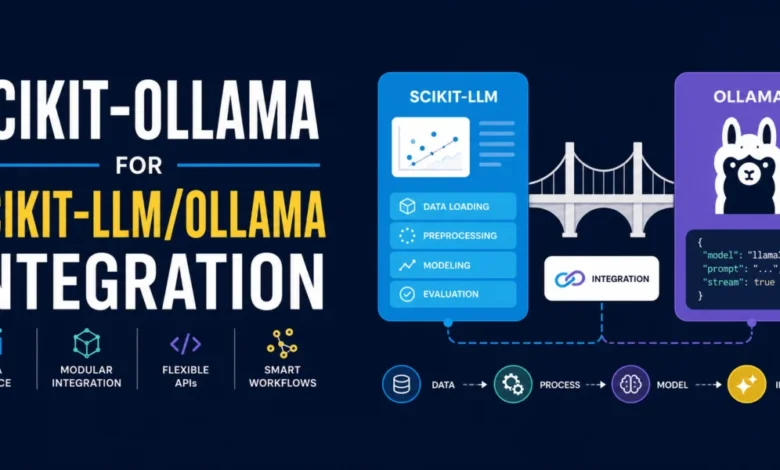
The landscape of artificial intelligence is undergoing a profound transformation, with Large Language Models (LLMs) moving from the exclusive domain of cloud-based services to accessible, locally deployed applications. This shift promises enhanced data privacy, reduced operational costs, and greater control over computational resources. A significant development in this burgeoning field is the emergence of libraries like scikit-ollama, which acts as a crucial bridge, seamlessly integrating the familiar scikit-learn interface with powerful, locally running Ollama models. This innovation empowers developers and researchers to perform sophisticated tasks such as zero-shot text classification without the need for expensive cloud API calls or the exposure of sensitive data to third-party servers.
This article delves into the practical application of scikit-ollama, demonstrating how it enables zero-shot text classification using a locally hosted Llama 3 model. We will explore the technical underpinnings of this integration, providing a step-by-step guide to setting up the environment, loading data, and executing classification tasks. The focus will be on a real-world use case: sentiment analysis of movie reviews, illustrating the library’s efficacy and user-friendliness.
The Rise of Local LLMs and the Need for Accessible Integration
For years, the primary avenue for leveraging the capabilities of LLMs has been through commercial cloud APIs offered by major tech companies. While these services provide immense power and scalability, they come with inherent limitations. Businesses and individuals often face significant costs associated with API usage, especially for high-volume tasks. Furthermore, reliance on external services introduces concerns about data privacy and security, as proprietary or sensitive information must be transmitted and processed on remote servers. Bottlenecks in API quotas and network traffic can also impede real-time applications and research workflows.
The advent of open-source LLMs, coupled with efficient local deployment solutions like Ollama, has presented a compelling alternative. Ollama simplifies the process of downloading, installing, and running various LLM models on personal computers and servers, making advanced AI capabilities accessible to a wider audience. However, the direct integration of these local models into established machine learning pipelines, particularly those adhering to the widely adopted scikit-learn ecosystem, remained a challenge.
This is where scikit-ollama, building upon the foundational work of scikit-llm, steps in. It abstracts away the complexities of direct LLM interaction, offering an interface that mirrors the intuitive structure of scikit-learn. This allows users familiar with traditional machine learning workflows to readily adopt LLM-powered inference without a steep learning curve. The library’s core innovation lies in its ability to reframe LLM tasks, such as text generation, into a structured format suitable for predictive modeling, effectively transforming general-purpose LLMs into specialized classifiers.
A Practical Walkthrough: Zero-Shot Sentiment Classification with Llama 3
To illustrate the power and simplicity of scikit-ollama, we will embark on a step-by-step guide to building a zero-shot sentiment classifier. This process involves setting up the necessary software, loading a relevant dataset, and then utilizing the scikit-ollama library to perform the classification.
1. Environment Setup and Installation
The first prerequisite for utilizing scikit-ollama is a compatible Python environment. The library requires Python version 3.9 or higher. Users should verify their current Python version. For those operating with an older version, it is imperative to upgrade or switch to a newer Python installation, ideally within a virtual environment to manage dependencies effectively.
Once the Python environment is confirmed to be compatible, the scikit-ollama library can be installed using pip, the standard Python package installer. The command is straightforward:
pip install scikit-ollamaThis command will download and install the library and its dependencies, preparing the system for LLM integration.
2. Data Preparation: Sentiment Analysis Dataset
Scikit-llm, the underlying framework for scikit-ollama, provides a convenient catalog of pre-curated datasets. For our sentiment analysis task, we will leverage one of these text-based datasets specifically designed for classification. The get_classification_dataset() function from skllm.datasets can be used to load this data.
The dataset typically comprises movie reviews as the input text (X) and their corresponding sentiment labels (y). The expected labels in this particular dataset are "positive," "negative," and "neutral."
from skllm.datasets import get_classification_dataset

# Loading a demo sentiment analysis dataset containing movie reviews
# The expected labels are: "positive", "negative", "neutral"
X, y = get_classification_dataset()

print(f"Sample text: X[0] nLabel: y[0]")
Executing this code snippet will display an example movie review and its associated sentiment label, providing a tangible glimpse into the data we will be working with. For instance, a sample output might reveal:
"Sample text: I was absolutely blown away by the performances in ‘Summer’s End’. The acting was top-notch, and the plot had me gripped from start to finish. A truly captivating cinematic experience that I would highly recommend.
Label: positive"
This demonstrates the nature of the task: categorizing textual content based on its emotional tone.
3. Integrating Local Ollama Models
The next critical step involves setting up and configuring the local Ollama environment. Users must first ensure that Ollama is installed on their machine. Detailed instructions for installation can be found on the official Ollama website, which typically involves downloading a binary and running a simple setup script.
Following the Ollama installation, a specific LLM model needs to be downloaded. For this demonstration, we will use llama3:latest, a powerful and versatile model. This can be achieved by running the following command in the terminal:
ollama pull llama3:latestOnce Ollama and the desired model are in place, we can proceed to instantiate the ZeroShotOllamaClassifier from the scikit-ollama library. This class is designed to leverage local Ollama models for zero-shot classification tasks.
from skollama.models.ollama.classification.zero_shot import ZeroShotOllamaClassifier

# Initializing the classifier with our local Ollama model: llama3:latest
clf = ZeroShotOllamaClassifier(model="llama3:latest")
It is crucial to understand the significance of this instantiation. While llama3:latest is a general-purpose LLM capable of a wide array of tasks, including conversational AI and content generation, scikit-ollama, in conjunction with scikit-llm, ingeniously reformulates the classification objective into a text-generation prompt. This prompt is syntactically constrained to elicit responses that are formatted and interpretable as classification labels. This mechanism allows the powerful reasoning capabilities of the LLM to be applied to predictive tasks while maintaining the structured output expected from traditional machine learning models. The value proposition of scikit-ollama and scikit-llm lies precisely in this elegant fusion of LLM power with the familiar scikit-learn interface for predictive analytics.
4. The Fit and Predict Paradigm
In the realm of traditional machine learning, the "fit" and "predict" cycle is fundamental. While the fit() method in scikit-ollama does not involve the updating of model weights as is common in supervised learning, its role is nonetheless vital. In the context of zero-shot LLM classification, the fit() call serves to register the set of candidate classification labels. This information guides the LLM during the inference process, enabling it to understand the potential categories it should assign to the input text.
# "Fitting" the model boils down to just providing the list of candidate labels
clf.fit(None, ["positive", "negative", "neutral"])
The None argument for the training data (X) signifies that no labeled data is used for traditional weight adjustment. Instead, only the predefined labels are provided to orient the LLM.
Following the "fit" stage, the predict() method is employed to generate classifications for new, unseen text data. When a collection of text reviews is passed to predict(), the local Ollama instance processes each input by constructing a specialized prompt. The library then intelligently parses the LLM’s output to ensure it aligns with one of the registered zero-shot classification labels. This entire process occurs seamlessly in the background.
# Generating and showing predictions on our dataset
predictions = clf.predict(X)

for text, prediction in zip(X[:3], predictions[:3]):
    print(f"Text: 'text'")
    print(f"Predicted Sentiment: predictionn")
The first execution of the predict() method might involve a slight delay as the local LLM initializes and loads. A progress bar typically accompanies this process, offering visual feedback. The output from this code snippet will display the original text samples and their corresponding predicted sentiment labels. For the provided example dataset, the output might look like this:
"Text: ‘I was absolutely blown away by the performances in ‘Summer’s End’. The acting was top-notch, and the plot had me gripped from start to finish. A truly captivating cinematic experience that I would highly recommend.’
Predicted Sentiment: positive
Text: ‘The special effects in ‘Star Battles: Nebula Conflict’ were out of this world. I felt like I was actually in space. The storyline was incredibly engaging and left me wanting more. Excellent film.’
Predicted Sentiment: positive
Text: ”The Lost Symphony’ was a masterclass in character development and storytelling. The score was hauntingly beautiful and complemented the intense, emotional scenes perfectly. Kudos to the director and cast for creating such a masterpiece.’
Predicted Sentiment: positive"
This demonstrates the successful application of the local LLM for sentiment classification, with the model accurately identifying the positive sentiment in each of the reviewed movie excerpts. The core achievement here is the ability to perform a specific inference task—text classification—entirely within the user’s local environment, leveraging the power of a sophisticated LLM without external dependencies.
Implications and Broader Impact
The successful integration showcased by scikit-ollama has significant implications for the broader AI and machine learning community.
-
Democratization of Advanced AI: By abstracting away the complexities of LLM deployment and offering a scikit-learn compatible interface, scikit-ollama makes cutting-edge AI capabilities accessible to a wider range of users, including those who may not have deep expertise in LLM architecture or cloud infrastructure management. This democratizes access to powerful tools for research, development, and deployment.
-
Enhanced Data Privacy and Security: The ability to run LLM inference locally addresses critical data privacy concerns. Sensitive text data, such as confidential customer feedback, proprietary research documents, or personal communications, can now be analyzed without ever leaving the user’s secure environment. This is particularly crucial for industries with strict data governance regulations, such as healthcare, finance, and legal services.
-
Cost Reduction and Predictable Expenses: Eliminating reliance on pay-per-use cloud APIs can lead to substantial cost savings, especially for organizations that process large volumes of text data. Local deployment offers a more predictable cost structure, primarily involving the initial hardware investment and electricity consumption, rather than variable API charges.
-
Offline Capabilities and Reduced Latency: Local LLM deployment enables applications to function even without an active internet connection. This is invaluable for edge computing scenarios, remote locations, or mission-critical applications where uninterrupted operation is paramount. Furthermore, processing requests locally can significantly reduce latency compared to round-trips to cloud servers, leading to more responsive user experiences.
-
Customization and Fine-Tuning: While this article focuses on zero-shot classification, the underlying architecture of scikit-ollama and scikit-llm is designed to be extensible. This opens avenues for more advanced use cases, including fine-tuning local LLMs on specific domain data for even higher accuracy and specialized tasks, a level of customization often difficult or cost-prohibitive with proprietary cloud APIs.
Future Directions and Considerations
The scikit-ollama library represents a significant step forward in making advanced LLM capabilities more accessible and practical. As LLMs continue to evolve in size and capability, libraries like scikit-ollama will play an increasingly vital role in bridging the gap between raw model power and actionable insights derived through familiar machine learning paradigms.
Future developments may include support for a wider array of Ollama-compatible models, enhanced performance optimizations for local inference, and even more sophisticated prompt engineering techniques to unlock the full potential of zero-shot and few-shot learning within the scikit-learn framework. As the ecosystem matures, we can anticipate scikit-ollama becoming an indispensable tool for developers and data scientists looking to harness the power of local LLMs for a diverse range of predictive modeling tasks, ushering in an era of more private, cost-effective, and flexible AI deployment.