Descript Redefines Content Editing with AI-Powered Transcript-Based Workflow, Targeting Podcasters and Solo Creators

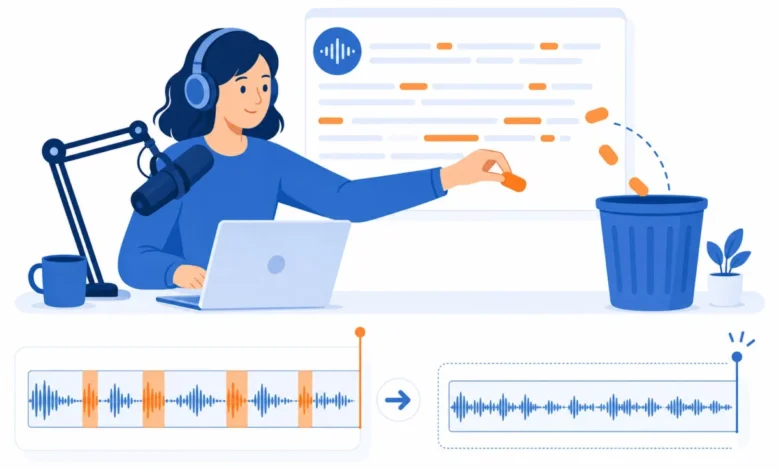
Descript, an innovative video and audio editor, is transforming content creation by introducing a paradigm shift in media editing: manipulating media directly through its transcribed text. This unique approach, where cutting a paragraph simultaneously cuts the corresponding audio or video, has positioned Descript as a pivotal tool for podcasters and solo content creators seeking enhanced efficiency and advanced AI capabilities. The platform’s Creator plan, priced at $24/month when billed annually, is widely considered the optimal choice for most professional podcasters, offering 30 media hours monthly alongside a comprehensive suite of AI features. A free tier is also available, providing ample opportunity for prospective users to evaluate the workflow’s suitability before committing financially.
The Evolution of Content Editing: From Timelines to Text
Traditionally, audio and video editing has been a meticulous, timeline-based process. Tools like Adobe Premiere Pro, Final Cut Pro, and even simpler mobile editors such as CapCut require creators to navigate complex visual timelines, painstakingly identifying and manipulating segments. This method, while offering granular control, often proves time-consuming and counter-intuitive for individuals whose primary mode of thought is linguistic rather than visual.
Descript emerged as a direct response to this challenge, fundamentally reimagining the editing interface. Instead of a timeline, users interact with a automatically generated transcript of their media. Whether recording new content, importing existing files, or simply pasting a link, Descript transcribes the audio and video, allowing users to edit the media as if they were editing a Google Doc. Deleting a sentence or paragraph seamlessly removes the corresponding audio/video segment. Rearranging text blocks instantly reorders the media. This core concept represents a significant workflow improvement, particularly for the vast majority of podcasters, educators, and content creators who think and plan in words.
The platform’s development has seen continuous integration of artificial intelligence, steadily enhancing its capabilities and solidifying its position at the forefront of media technology. Key updates, such as the introduction of AI Actions in 2025-2026 and Overdub 3.0 in 2026 with emotional control, underscore Descript’s commitment to leveraging AI to streamline and elevate the content creation process. The platform’s efficacy was rigorously re-verified in July 2026, with all pricing structures confirmed against Descript’s live pages to ensure accuracy amidst evolving market conditions.
Descript’s Core Innovation: Transcript-Based Editing in Practice
The cornerstone of Descript’s appeal lies in its transcript-based editing. For a 45-minute podcast episode, a creator can import the recording, and within moments, a highly accurate transcript is generated. The editing process then shifts from listening intently and marking timeline cuts to simply reading and editing text. Filler words ("um," "ah," "you know") can be removed with a single click. Tangential discussions are eliminated by deleting their corresponding paragraphs. Entire sections can be rearranged by dragging and dropping text blocks. The audio and video automatically synchronize with every text edit, eliminating the need for manual timeline adjustments.
This radical shift in workflow yields dramatic time savings. For many creators, an edit that previously consumed 2-3 hours in traditional timeline editors, requiring real-time listening and precise manual cuts, can now be completed in approximately 45 minutes using Descript. This efficiency gain is not merely incremental but transformative, freeing up creators to focus on content quality, promotion, or other aspects of their business.
Advanced AI Features Driving Efficiency and Quality
Beyond its core editing mechanism, Descript integrates a suite of AI-powered features that significantly enhance production quality and workflow efficiency.
Studio Sound: One-Click Audio Perfection
Studio Sound is a revolutionary one-click audio restoration tool that has proven invaluable for creators recording in less-than-ideal conditions. Leveraging advanced AI algorithms, it effectively removes background noise, suppresses echo, and mitigates room reverb. The result is a dramatically improved audio quality, often making recordings captured with a laptop microphone sound as if they were produced in a professional studio environment. This feature has been credited with salvaging episodes recorded in challenging locations such as hotel rooms, bustling coffee shops, or even moving vehicles, underscoring its practical utility for mobile and remote creators.
AI Actions for Content Repurposing
Introduced in the 2025-2026 timeframe, AI Actions address the growing need for efficient content repurposing across multiple platforms. In today’s digital landscape, a single long-form piece of content (like a podcast episode or a long video) needs to be adapted into various formats for social media, blogs, and marketing. Descript’s AI Actions can automatically generate:
- Short social media clips: Identifying key moments and transforming them into shareable snippets.
- Blog post summaries or drafts: Extracting main points and structuring them into written content.
- Show notes and episode descriptions: Automating the creation of textual companions for audio content.
While not always producing final-draft quality (creators might still prefer human refinement or more advanced AI like Claude for final blog posts), this feature serves as an incredibly useful starting point, drastically reducing the manual effort and time typically required to create diverse derivative content.
Overdub (Voice Cloning): Seamless Corrections and Ethical Considerations
Overdub, now in its 3.0 iteration as of 2026, represents Descript’s voice cloning technology. After training the AI with approximately three minutes of a user’s voice, Overdub can generate new audio in that voice by simply typing text. Overdub 3.0 further enhanced this capability with emotional control, allowing users to specify tones such as whisper, shout, or excited inflections.
The primary use case for Overdub is making small, imperceptible corrections to recordings. If a creator mispronounces a name, states an incorrect date, or needs to insert a brief clarification, instead of re-recording an entire section, they can type the correction, and Overdub generates it seamlessly in their voice. Listeners typically cannot detect the edit. While the ability for AI to clone a voice from minimal audio raises valid ethical questions, Descript addresses these by requiring users to clone only their own voice through a verified consent script, preventing unauthorized voice replication. For individual creators, it offers a powerful tool for maintaining flow and accuracy without extensive re-recording sessions.
Eye Contact AI: Enhancing Viewer Engagement
Primarily beneficial for video creators, Eye Contact AI is a subtle yet impactful feature. It intelligently adjusts a speaker’s gaze in video footage to simulate direct eye contact with the camera, even if the speaker is reading notes, looking at a second monitor, or glancing away. This technology works effectively even with glasses. The effect, while subtle, significantly enhances the presenter’s perceived engagement and presence on camera, leading to a more professional and captivating viewing experience. It is particularly useful for recording instructional videos, workshop promotions, or any content where direct viewer connection is paramount.
Quick Recorder: High-Quality Remote Recording
Addressing the challenges of remote collaboration, Descript’s Quick Recorder facilitates high-quality recordings with up to 10 guests. A critical advantage of this feature is that each participant’s audio and video are recorded locally on their device, then automatically synced within Descript. This bypasses the common quality degradation associated with internet-dependent recordings (e.g., Zoom), ensuring pristine individual tracks. For podcasters regularly featuring guests, Quick Recorder has become a preferred alternative to general video conferencing tools, delivering superior raw material for editing.
Pricing Structure and Accessibility for Creators
Descript offers a tiered pricing model designed to accommodate a range of users, from hobbyists to business teams. The terminology "media hours" is crucial here, as it encompasses all usage, including untranscribed uploads for trimming, making it a broader allowance than pure "transcription hours." All prices were confirmed in July 2026.
| Plan | Annual | Monthly | Media Hours | What You Get |
|---|---|---|---|---|
| Free | $0 | $0 | 1 hr | 720p export, 5 min AI speech |
| Hobbyist | $16/mo | $24/mo | 10 media hrs | 1080p export |
| Creator | $24/mo | $35/mo | 30 media hrs (+5) | 2 hr AI speech, 4K export, full AI features |
| Business | $50/mo | $65/mo | 40 media hrs (+10) | 5 hr AI speech, team collaboration |
The Creator plan, at $24/month (annual billing), consistently emerges as the sweet spot for most dedicated creators. Its 30 media hours (plus 5 bonus) are typically sufficient for producing 6-8 podcast episodes per month, easily accommodating weekly content schedules. This tier also unlocks full AI features, including 2 hours of AI speech for Overdub, and 4K export capabilities, catering to the demands of professional-grade content. While the Free tier provides a valuable entry point for testing the workflow, the jump to Creator offers substantial benefits for serious creators.
Acknowledging Limitations: The Honest Cons
Despite its groundbreaking advantages, Descript is not without its considerations:
Transcription Accuracy
While Descript’s transcription is generally good, achieving approximately 95% accuracy for clear English, it does face challenges. Accuracy can diminish with strong accents, specialized jargon, multiple simultaneous speakers, or poor audio quality. Consequently, creators intending to publish transcripts as text will still need to proofread them diligently. However, for the primary purpose of editing audio/video, minor transcription errors are often inconsequential as the user is cutting the underlying media, not the text itself for publication.
The Learning Curve
The core concept of text-based editing is intuitive once grasped, but Descript’s continuously expanding feature set can initially overwhelm new users. Features like Composition mode, Scenes, Overlays, Templates, and various AI Actions present a rich but potentially complex interface. The recommended approach for new users is to focus exclusively on the transcript editor for their first project, gradually integrating additional features as specific needs arise. This phased learning helps mitigate the initial complexity.
Export Speed
Exporting completed projects, such as a 45-minute episode, can take 5-10 minutes on a high-end machine like a MacBook Pro. While not excessively long, this can be noticeable for users accustomed to real-time exports in simpler tools. Business plan subscribers benefit from priority processing, potentially mitigating this wait time.
Price for Teams
For larger teams, the Business plan at $50/month per seat (annual billing) can accumulate costs quickly. A team of three, for instance, would incur $150/month solely for editing software. In such scenarios, enterprise solutions like Adobe Creative Cloud with Premiere Pro might present a more cost-effective option for organizations requiring multiple licenses and a broader suite of professional tools.
Market Positioning and Target Audiences
Descript has carved out a distinct niche in the content creation ecosystem:
- Podcasters: This is Descript’s primary and most evident audience. The transcript-based workflow offers unparalleled time savings for audio editing, while Studio Sound ensures professional-grade audio quality, and Overdub provides seamless error correction. For podcasters, Descript is arguably the most efficient editing tool available.
- Solo Video Creators: YouTubers, online course instructors, and individual video producers benefit immensely from the speed of text-based editing for talking-head videos. Features like Eye Contact AI and Studio Sound directly enhance the production value of their content without requiring extensive technical expertise.
- Content Repurposers: Individuals and small teams focused on converting long-form content into short clips, blog posts, and social media updates will find Descript’s AI Actions and integrations (e.g., with Opus Clip) invaluable for accelerating their multi-platform content strategy.
Conversely, Descript is not ideal for professional video editors who require highly precise timeline control, intricate color grading capabilities, advanced motion graphics, or complex visual effects. While powerful, Descript prioritizes speed and accessibility over the granular control offered by dedicated non-linear editors like Premiere Pro or DaVinci Resolve. It is a tool that trades some aspects of traditional video precision for dramatic gains in editing speed and content output for specific formats.
Descript in the Competitive Landscape
- Descript vs. Premiere Pro: These are distinct tools for different purposes. Premiere Pro excels in complex, visually intensive video editing, offering unparalleled control over every frame. Descript, conversely, is engineered for speed and efficiency in narrative-driven content (podcasts, talking-head videos), often proving 5x faster for these specific tasks. Many creators adopt a hybrid workflow, using Descript for initial rough cuts and a traditional editor for final polish and complex visual elements.
- Descript vs. Riverside: Riverside primarily focuses on high-quality remote recording. While Descript now includes its Quick Recorder for this purpose, Riverside might still be preferred for its more advanced remote recording features, such as live streaming capabilities and more extensive separate track controls. However, Descript’s strength lies in its comprehensive post-production capabilities once the recording is done.
- Descript vs. Otter.ai (for transcription only): Otter.ai offers a cheaper solution for pure transcription services. However, Descript integrates transcription directly into the editing workflow, eliminating the need for separate tools and streamlining the entire production process from raw audio to polished content. For creators who intend to edit their media, Descript’s integrated approach provides superior value.
Broader Impact and Future Implications
Descript’s innovative approach has significant implications for the broader content creation industry. By democratizing access to professional-grade editing and AI tools, it lowers the barrier to entry for aspiring creators, enabling them to produce high-quality content without years of technical training. This contributes directly to the exponential growth of the creator economy, fostering a more diverse and vibrant media landscape. The efficiency gains offered by Descript allow creators to scale their output, explore new content formats, and dedicate more time to creative development rather than tedious post-production.
The trajectory of AI integration in Descript, exemplified by features like Overdub 3.0 and AI Actions, suggests a future where artificial intelligence will play an even more central role in automating mundane tasks, personalizing content, and enabling entirely new forms of media creation. As AI models become more sophisticated, the distinction between human and AI-assisted content generation will continue to blur, making tools like Descript indispensable for creators navigating this evolving environment.
Conclusion
In 2026, Descript stands as the premier tool for podcast editing and solo video production. Its transcript-based editing workflow is not a mere gimmick but a genuine innovation that delivers substantial time savings and a more intuitive creative process. The robust suite of AI features, including Studio Sound, Overdub, and Eye Contact AI, provides tangible value, elevating content quality and streamlining production at every stage.
The Creator plan, at $24/month with annual billing, represents the optimal investment for serious content producers, offering generous media hours and access to all critical AI functionalities. For those still tethered to traditional timeline editors for audio and talking-head video content, Descript offers a transformative alternative. The initial learning curve might feel unfamiliar, but experience suggests that after editing just a few projects, creators rarely return to their old workflows, cementing Descript’s position as an indispensable asset in the modern creator’s toolkit.
Frequently Asked Questions
Is the free tier sufficient for a proper trial?
Yes, the free tier provides 1 hour of media and 720p export capabilities, which is enough to edit one podcast episode or several short videos. This allows users to thoroughly evaluate if the unique text-based editing workflow aligns with their preferences before committing to a paid subscription.
Can Descript entirely replace a traditional editing workflow?
For podcasts and straightforward talking-head videos, Descript can indeed replace the entire editing workflow. However, for complex video projects involving extensive B-roll, intricate motion graphics, or precise color grading, many creators opt for a hybrid approach, utilizing Descript for the initial rough cut and a traditional editor for the final, visually demanding polish.
How does Overdub voice cloning work, and are there ethical concerns?
Overdub requires users to clone their own voice by reading a specific consent script, ensuring that voice cloning is only authorized and performed by the voice owner. It is not possible to clone someone else’s voice without their direct participation and verification. For correcting minor errors or inserting new lines in one’s own recordings, Overdub offers a powerful and ethically managed solution, saving significant re-recording time.
Is upgrading from Hobbyist to Creator justified for active users?
For creators producing weekly content or requiring advanced AI features, upgrading from the Hobbyist to the Creator plan is highly recommended. The increase from 10 to 30 (plus 5 bonus) media hours, along with the inclusion of full AI features (including 2 hours of AI speech for Overdub) and 4K export, provides substantial value and flexibility for consistent and high-quality content production.