The modern construction industry, a cornerstone of global infrastructure and economic development, operates at an unprecedented pace, driven by complex projects, tight deadlines, and evolving regulatory landscapes. Effective project management is no longer a luxury but a fundamental requirement for success. Central to this efficiency is robust construction project management software, a digital backbone that orchestrates planning, execution, and oversight. While Procore has established itself as a prominent name in this critical sector, a growing segment of construction managers and professionals are actively exploring alternative solutions. This comprehensive analysis delves into the leading Procore alternatives for 2026, offering insights to help firms identify the optimal software to meet their unique operational demands.
The Evolving Landscape of Construction Technology: Why Alternatives are Gaining Traction
The digital transformation within the construction industry has accelerated dramatically over the past decade. Projects have grown in scale and complexity, demanding sophisticated tools to manage everything from initial blueprints and resource allocation to on-site execution and financial tracking. Construction project management software has evolved from simple scheduling tools to integrated platforms offering end-to-end solutions. Procore, with its extensive suite of features, has undeniably played a significant role in standardizing many digital workflows. However, as the market matures and technology advances, firms are encountering various factors that prompt them to seek alternatives.
A primary driver behind this search for alternatives is often cost-effectiveness. While Procore offers a comprehensive package, its pricing structure can be a substantial investment, particularly for small to medium-sized enterprises (SMEs) or those with fluctuating project volumes. Companies are increasingly looking for solutions that provide robust functionality without an prohibitive price tag.
Another significant consideration is feature specificity and complexity. For some firms, Procore’s extensive feature set can lead to an overwhelming user experience, requiring considerable training and potentially underutilizing many functionalities. Niche contractors, residential builders, or heavy civil construction companies often find that a more specialized or streamlined platform can better address their particular workflows without unnecessary complexity. The demand for software that is intuitive and facilitates rapid user adoption across diverse teams—from office staff to field crews—is paramount.
Furthermore, the need for seamless integration with existing financial, design (CAD/BIM), and human resources systems is a critical factor. While many platforms offer integrations, the depth and ease of these connections vary, influencing a firm’s operational continuity. Customer support and responsiveness also play a pivotal role; effective technical assistance and a commitment to addressing user feedback can significantly impact a software’s long-term viability and user satisfaction. Finally, enhanced mobile accessibility and offline capabilities are non-negotiable for field teams who need real-time access to plans, task updates, and reporting from remote job sites. These multifaceted demands underscore the dynamic nature of the construction tech market and the continuous search for optimal tools.
Evaluating the Landscape: Core Features for 2026

Before examining specific alternatives, it’s crucial to establish a framework of essential capabilities that define leading construction project management software in 2026. These criteria guide our assessment and reflect the sophisticated needs of the industry:
- Robust Planning & Scheduling: Beyond basic Gantt charts, this includes critical path analysis, task dependencies (e.g., finish-to-start, start-to-start), baseline setting for variance tracking, and multiple project views (Kanban, list, calendar) to cater to diverse team preferences.
- Real-time Tracking & Reporting: Dynamic dashboards offering high-level overviews of key performance indicators (KPIs) like time, cost, and progress. Customizable reports with filtering options for in-depth data analysis are also vital for informed decision-making.
- Comprehensive Resource Management: Tools for managing human resources (workload balancing, timesheets), equipment, and materials, ensuring optimal utilization and preventing bottlenecks.
- Seamless Collaboration: Features that facilitate communication and file sharing among internal teams, external contractors, and clients. This includes comment functionalities, document version control, and secure guest access.
- Mobile Accessibility & Offline Capabilities: Intuitive mobile applications that allow field teams to update tasks, upload photos, log hours, and access project documents even without an internet connection.
- Financial Management Integration: Capabilities for budgeting, cost tracking, change order management, and seamless integration with popular accounting software (e.g., QuickBooks, Xero).
- Document Management: Centralized, secure storage for all project documentation, including drawings, contracts, RFIs, submittals, and daily logs, with robust version control.
- Risk & Issue Management: Tools to identify, track, and manage potential risks and issues, mitigating their impact on project timelines and budgets.
- Scalability & Pricing Model: Software that can grow with the company, offering flexible pricing structures that accommodate varying team sizes and project complexities.
Top Alternatives for 2026: An In-Depth Analysis
Our comprehensive evaluation of the leading Procore alternatives for 2026, presented from top-ranked to highly capable, aims to provide construction professionals with a clear understanding of each platform’s strengths, limitations, and optimal use cases.
1. ProjectManager: Leading the Pack for Comprehensive Solutions

ProjectManager stands out as an award-winning construction project management software, offering a balanced suite of tools designed for planning, resource management, and real-time progress reporting. Its appeal as a top Procore alternative lies in its competitive pricing and user-friendly interface, making sophisticated project management accessible without a steep learning curve.
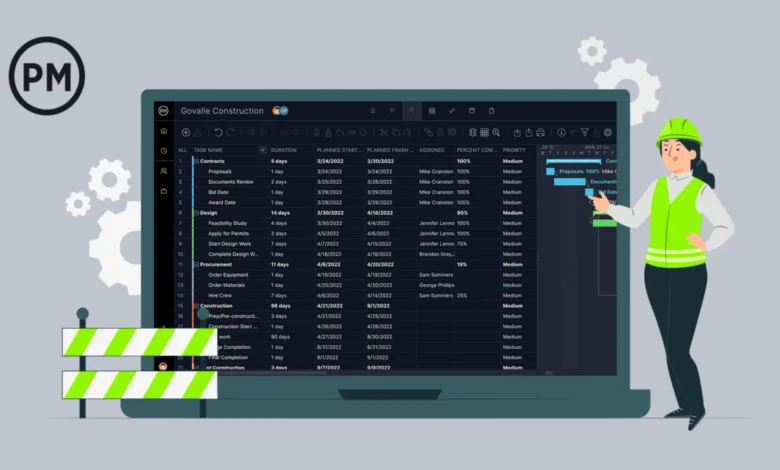
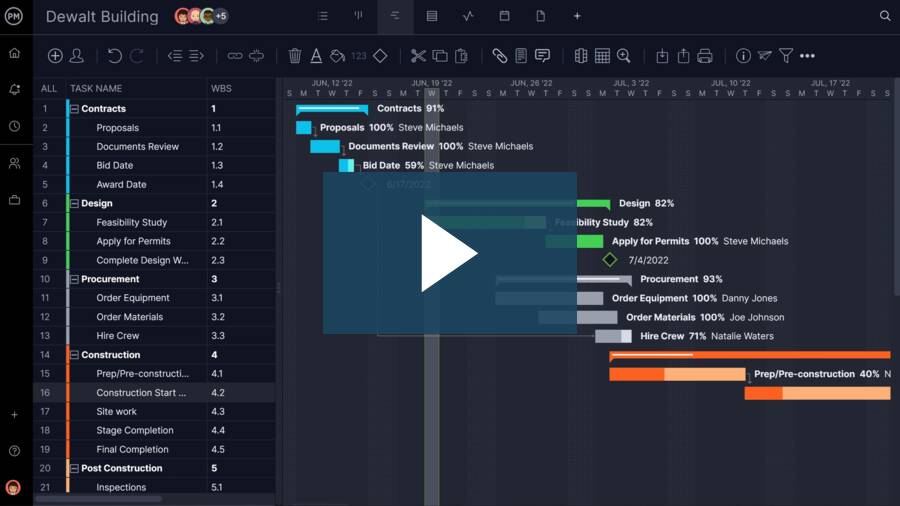
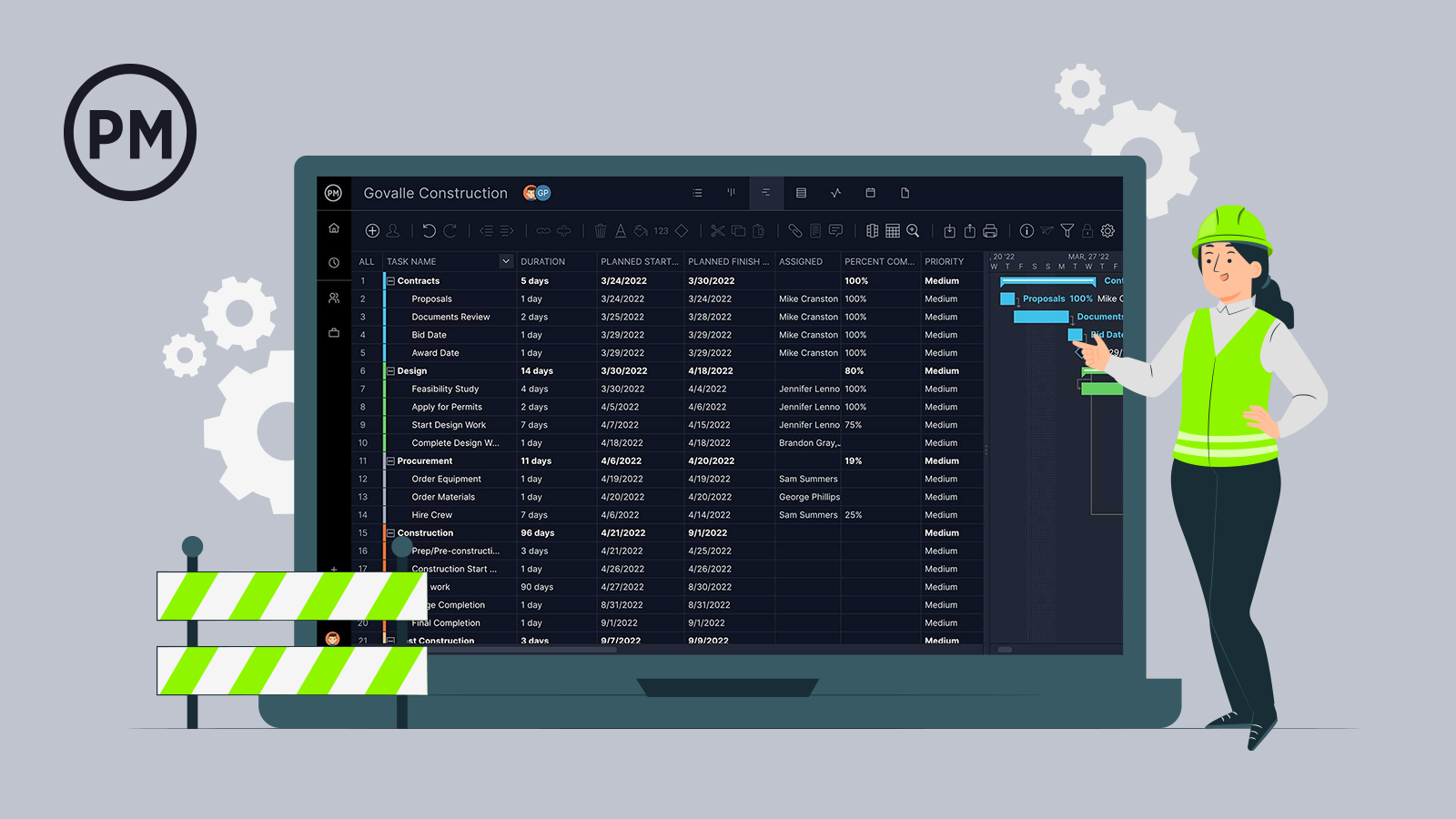
- Best-in-Class Construction Planning: The platform provides advanced Gantt charts, crucial for construction, with four types of task dependencies to meticulously map out project timelines and prevent delays. Critical path filtering helps identify essential tasks, while baseline tracking allows real-time monitoring of project variance against initial plans. Beyond Gantt, ProjectManager offers Kanban boards for visual workflow management, task lists, sheet views, and calendar views, all dynamically linked to ensure consistent data across the project.
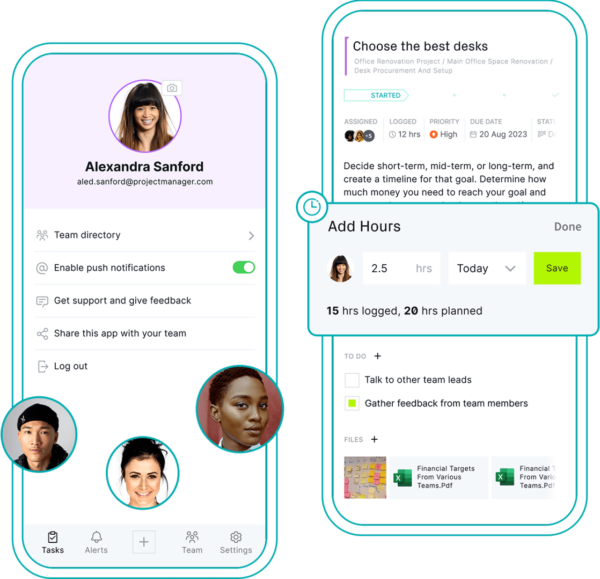
- Resource Management and Collaboration: ProjectManager includes robust resource management tools for both human and non-human assets, featuring detailed timesheets and workload charts to optimize team productivity and prevent burnout. A significant advantage for collaboration is the provision of free guest licenses, enabling seamless communication and progress updates with clients and external contractors. The intuitive mobile app empowers field teams to upload site photos and log hours directly, enhancing real-time data flow. Enterprise-grade security ensures sensitive project data remains protected.
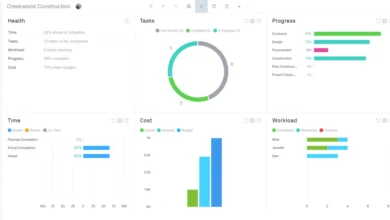
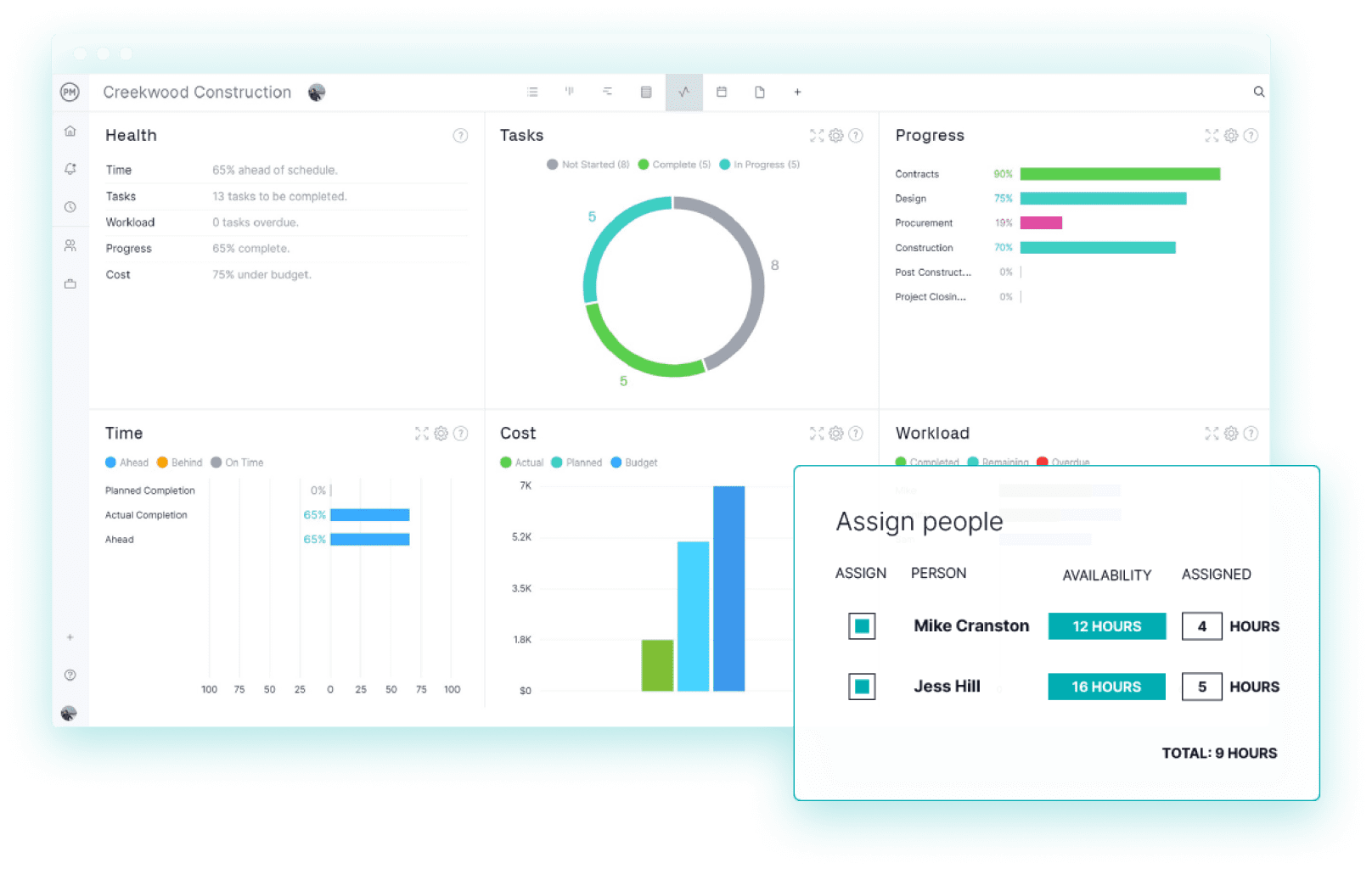
- Real-time Tracking and Performance Analysis: For project oversight, ProjectManager delivers real-time dashboards that require minimal setup, providing instant, high-level insights into project health, cost, and schedule through clear graphs and charts. Its reporting features offer granular data, customizable through filters, enabling managers to make data-driven decisions to stay on budget and schedule. Integrated risk management features further enhance its capability to proactively identify and mitigate potential issues.
ProjectManager Pros & Key Features:
- Advanced Gantt charts with dependencies and critical path analysis.
- Multiple project views (Kanban, list, sheet, calendar) with real-time synchronization.
- Comprehensive resource and time management, including timesheets and workload charts.
- Free guest licenses for enhanced client and contractor collaboration.
- Intuitive mobile app for field data capture and offline access.
- Real-time dashboards and customizable reporting for granular insights.
- Integrated risk and issue management.
- Unlimited file storage and project archiving.
- Competitive pricing with a free trial available.
ProjectManager Cons & Limitations:
- While comprehensive, some highly specialized construction-specific modules (e.g., advanced BIM integration beyond document linking) might require deeper third-party integrations.
ProjectManager Pricing: Offers tiered plans, including a free trial, with competitive monthly and annual subscriptions designed to scale with team and project needs.
ProjectManager Reviews: Consistently high ratings on major review platforms, praising its ease of use, robust feature set, and customer support.
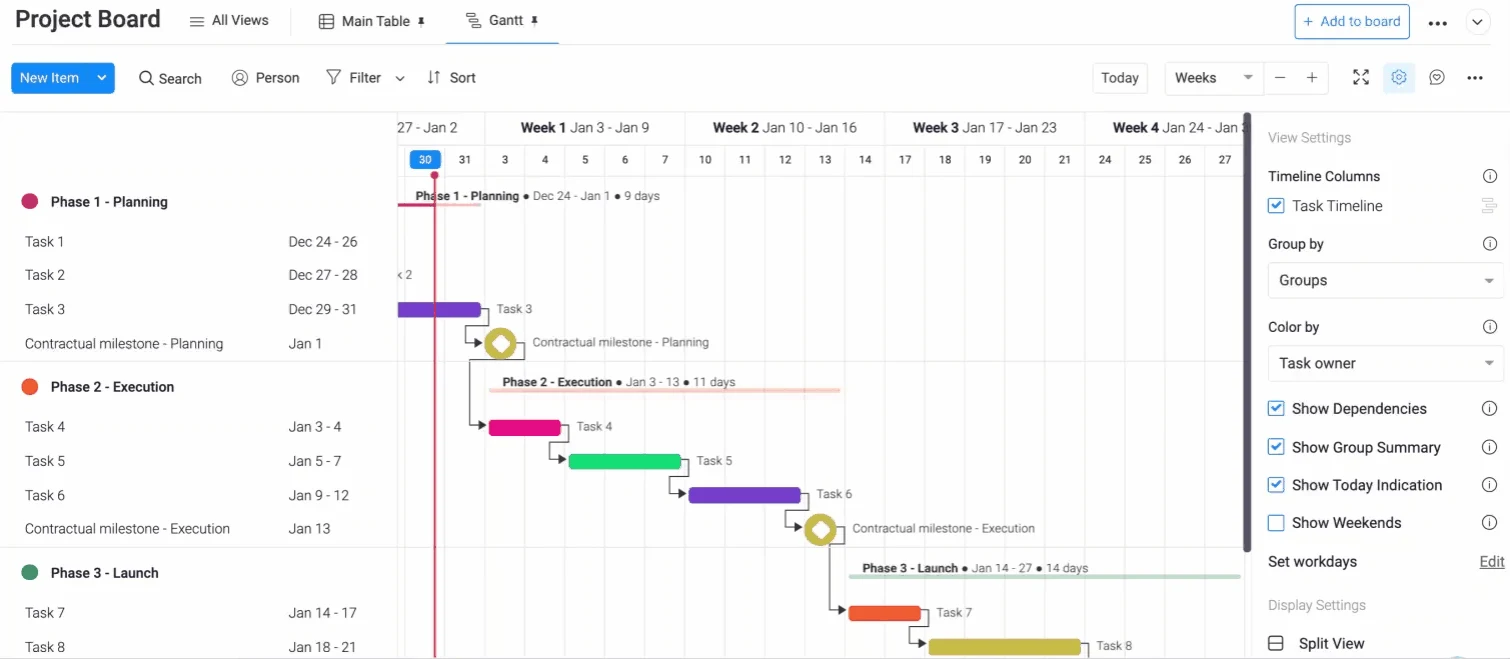
2. monday.com: Versatility for Diverse Workflows
monday.com presents itself as a flexible work management platform, not exclusively built for construction but highly adaptable. Its visual dashboards, workflow automation, and extensive template library make it a viable Procore alternative, especially for organizations seeking a unified platform across multiple departments or industries.
monday.com Pros & Key Features:
- Highly customizable boards and visual dashboards for intuitive project tracking.
- Extensive library of templates, including construction-specific options.
- Powerful workflow automation to reduce manual tasks and streamline processes.
- Strong integration capabilities with numerous third-party tools (including Procore, Slack, Salesforce).
- Excellent for cross-team coordination and communication.
monday.com Cons & Limitations:
- Not purpose-built for construction, requiring workarounds for specific workflows like RFIs, submittals, or punch lists.
- Limited native financial tracking capabilities, often necessitating integration with dedicated accounting software.
- Per-seat pricing with a minimum seat requirement can become costly for larger teams or those heavily relying on automations and integrations.
monday.com Pricing: Offers several tiered plans (Basic, Standard, Pro, Enterprise) with varying features, user minimums, and pricing per user.
monday.com Reviews: Praised for its flexibility, visual interface, and ease of use, though some construction-specific users note the need for customization to fit industry standards.
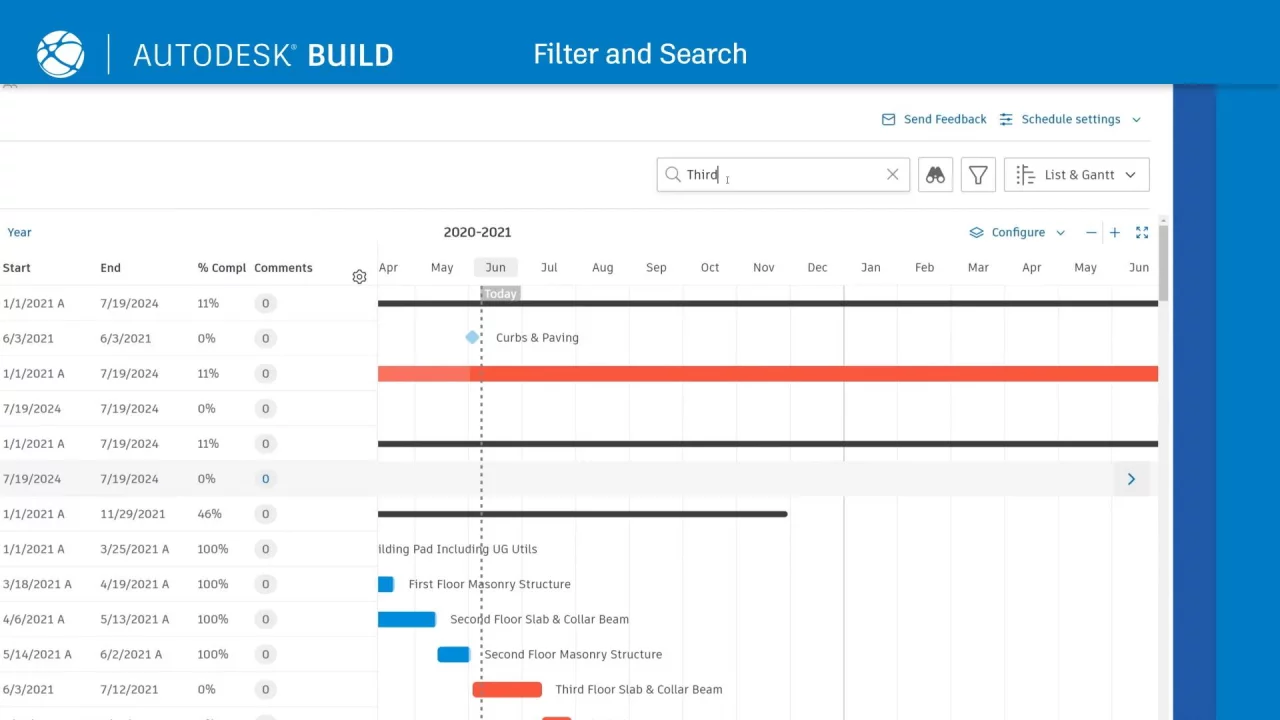
3. Autodesk Construction Cloud: The Integrated Design-to-Build Ecosystem
Autodesk Construction Cloud is a formidable Procore alternative, particularly for firms deeply embedded in design engineering and construction. It offers a comprehensive suite of products that span the entire project lifecycle, from design and preconstruction to on-site execution and project closeout.
Autodesk Pros & Key Features:
- Extensive suite covering design, preconstruction, construction, and operations.
- Strong document management, data federation, and issue management.
- Includes specialized modules for cost, quality, and safety management.
- Offers a mobile application for field use.
- Deep integration with Autodesk’s powerful design software (e.g., AutoCAD, Revit).
Autodesk Cons & Limitations:
- Can be complex and difficult to learn, requiring significant user training.
- High cost associated with its comprehensive bundles.
- Navigating its vast feature set can be challenging for new users.
- Limited interoperability with non-Autodesk CAD software.
Autodesk Pricing: Generally offered through various product bundles (e.g., Autodesk Build, Autodesk Takeoff) with subscription-based pricing that can be substantial.
Autodesk Reviews: Valued for its comprehensive capabilities and integration with design tools, but often cited for its complexity and cost.
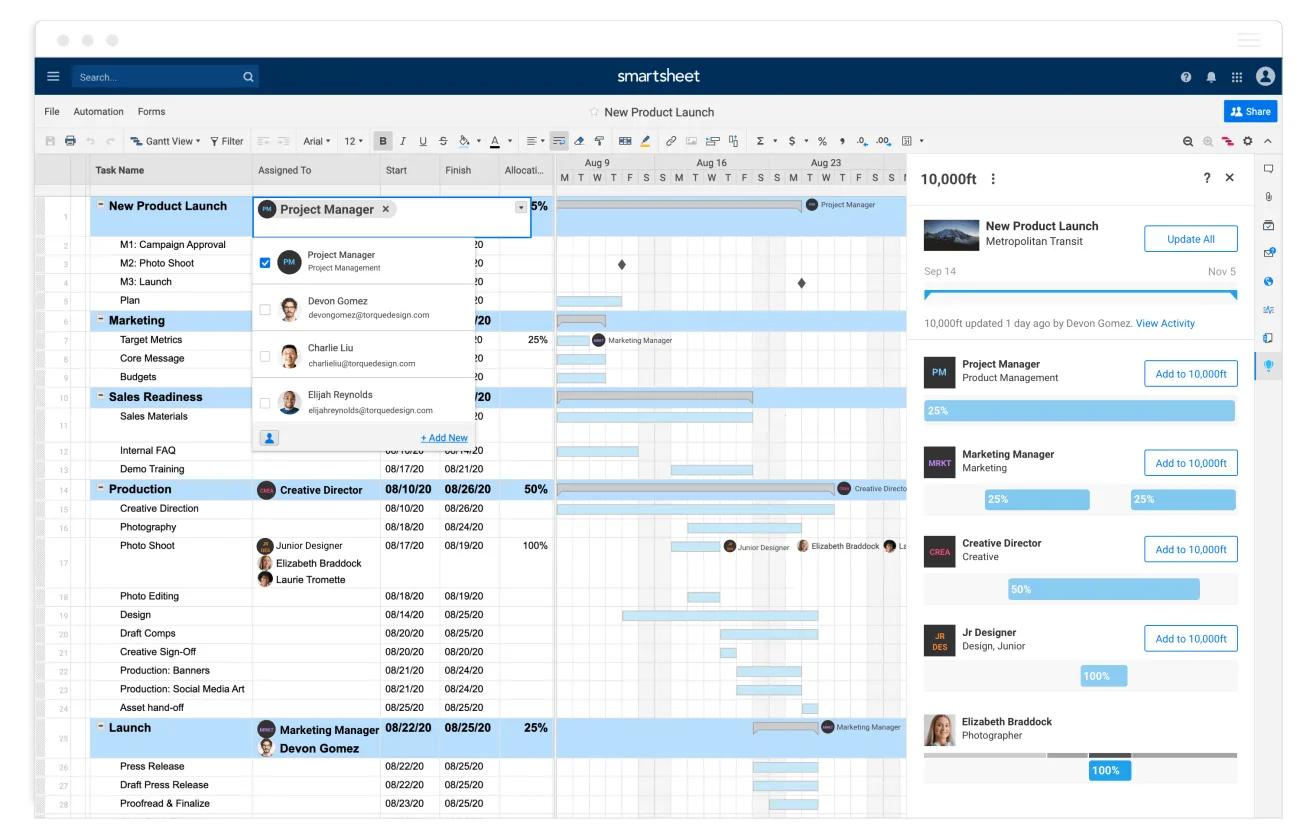
4. Smartsheet: Collaborative Project Streamlining
Smartsheet is a versatile project management software that shines in streamlining construction phases and enhancing real-time team collaboration. It serves as a powerful Procore alternative by connecting teams and providing managers with tools for staffing, scheduling, and priority management.
Smartsheet Pros & Key Features:

- Excellent collaboration features, enabling real-time information sharing.
- Strong integration capabilities with a wide range of popular software (Google, Microsoft, DocuSign, Salesforce, Procore itself).
- Highly customizable with many scheduling templates.
- Scalable processes to reduce redundant work and optimize resource allocation.
- Dashboards for improved project visibility.
Smartsheet Cons & Limitations:
- Can have a steep learning curve, especially for complex tasks, making it less intuitive for some users.
- Limited data security features compared to enterprise-grade construction-specific platforms, posing challenges for sensitive data.
- Mobile app functionality is less robust than the web version, potentially hindering field teams.
- Reporting features, while present, may lack the depth for advanced data analysis required by larger projects.
Smartsheet Pricing: Offers various plans (Pro, Business, Enterprise) with per-user pricing, increasing with features and support.
Smartsheet Reviews: Praised for its flexibility and integration ecosystem, but some users desire more robust reporting and an improved mobile experience.
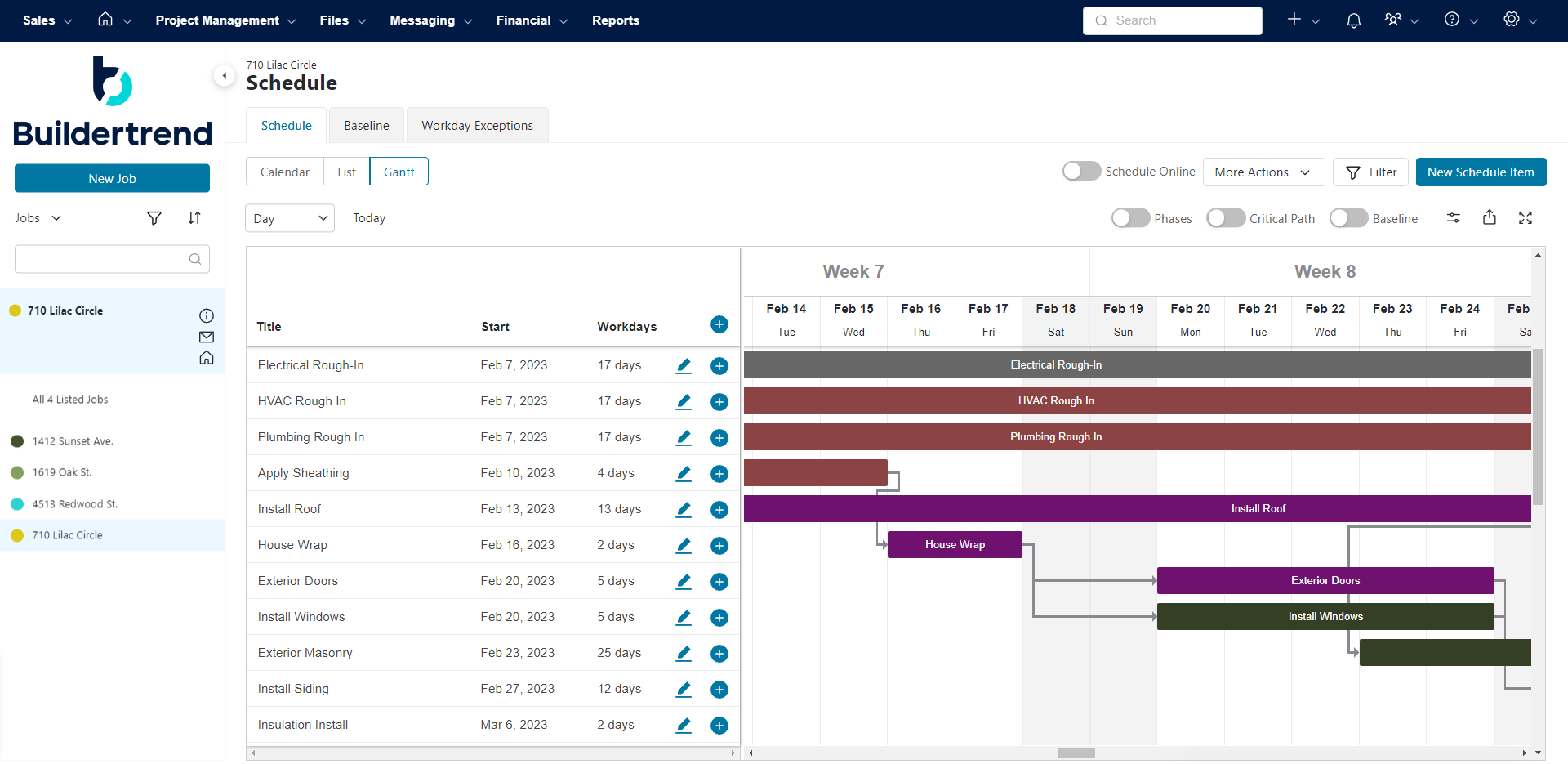
5. Buildertrend: Bridging Sales and Project Execution
Buildertrend positions itself as a Procore alternative that uniquely integrates pre-sale tools with construction project management. It includes a customer relationship management (CRM) system, bid requests, and project proposal functionalities, alongside traditional scheduling and budgeting. Each customer receives dedicated account management, offering personalized training and support.
Buildertrend Pros & Key Features:
- Integrated CRM features for lead management, bid requests, and proposals.
- Comprehensive change order and selection management.
- Warranty request and payment processing functionalities.
- Timesheets and integrations with accounting software like QuickBooks and Xero.
- Dedicated account manager for training and support.
Buildertrend Cons & Limitations:
- CRM tools, while integrated, are often considered less sophisticated than dedicated CRM platforms (e.g., Salesforce), potentially limiting advanced sales and marketing capabilities.
- Users have reported issues with the lack of an autosave feature, leading to potential data loss.
- Subcontractor permissions for creating change orders are limited.
- Reporting features may not provide the desired depth for all stakeholders.
Buildertrend Pricing: Offers tiered plans (Essential, Advanced, Complete) with varying feature sets and pricing structures.

Buildertrend Reviews: Appreciated for its integration of sales and project management, but some users desire more robust CRM functionality and improved data saving.
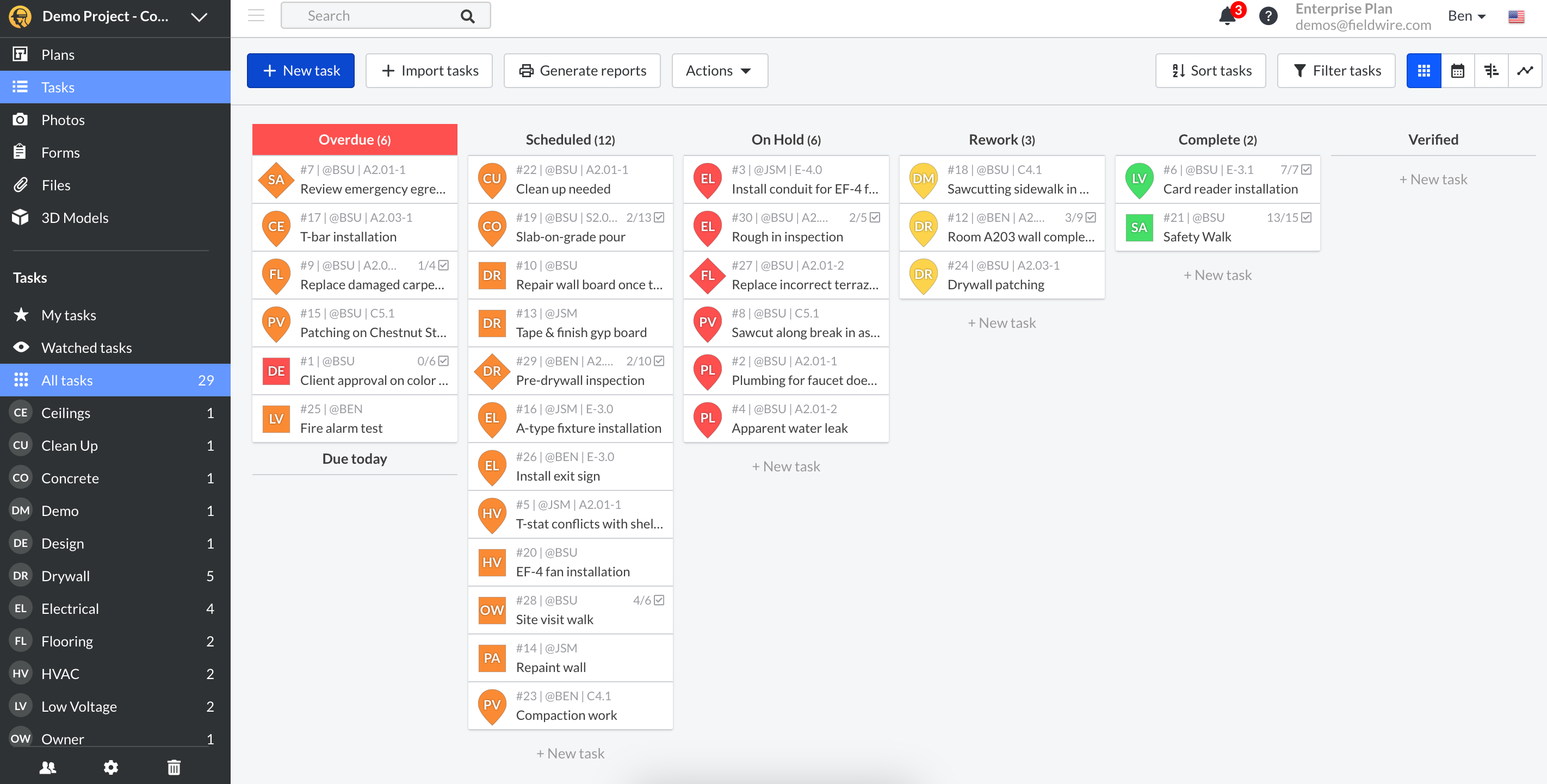
6. Fieldwire (Hilti Fieldwire): The Field-First Powerhouse
Fieldwire, now part of Hilti, is a construction project management platform purpose-built for job sites. It excels at connecting on-site crews with office teams through real-time plan viewing, task management, and punch list tracking, all accessible offline on mobile devices. It’s a popular choice for general and specialty contractors prioritizing field-to-office coordination.
Fieldwire Pros & Key Features:
- Robust plan management system for viewing, marking up, and sharing drawings in real time, even offline.
- Task management directly linked to drawing locations.
- Configurable punch lists and inspection checklists for quality control.
- Automatic PDF report generation for owners and project teams.
- Excellent mobile app for on-site use.
Fieldwire Cons & Limitations:
- Lacks native financial management tools (budgeting, cost tracking, invoicing), requiring integration with separate software.
- Per-user pricing can become expensive for larger teams.
- Its field-centric focus means some back-office project management features may be less developed than broader platforms.
Fieldwire Pricing: Offers a free basic plan, and tiered paid plans (Pro, Business, Enterprise) with per-user pricing based on features.
Fieldwire Reviews: Highly praised for its intuitive mobile interface and powerful field management capabilities, though its lack of financial tools is a common point.
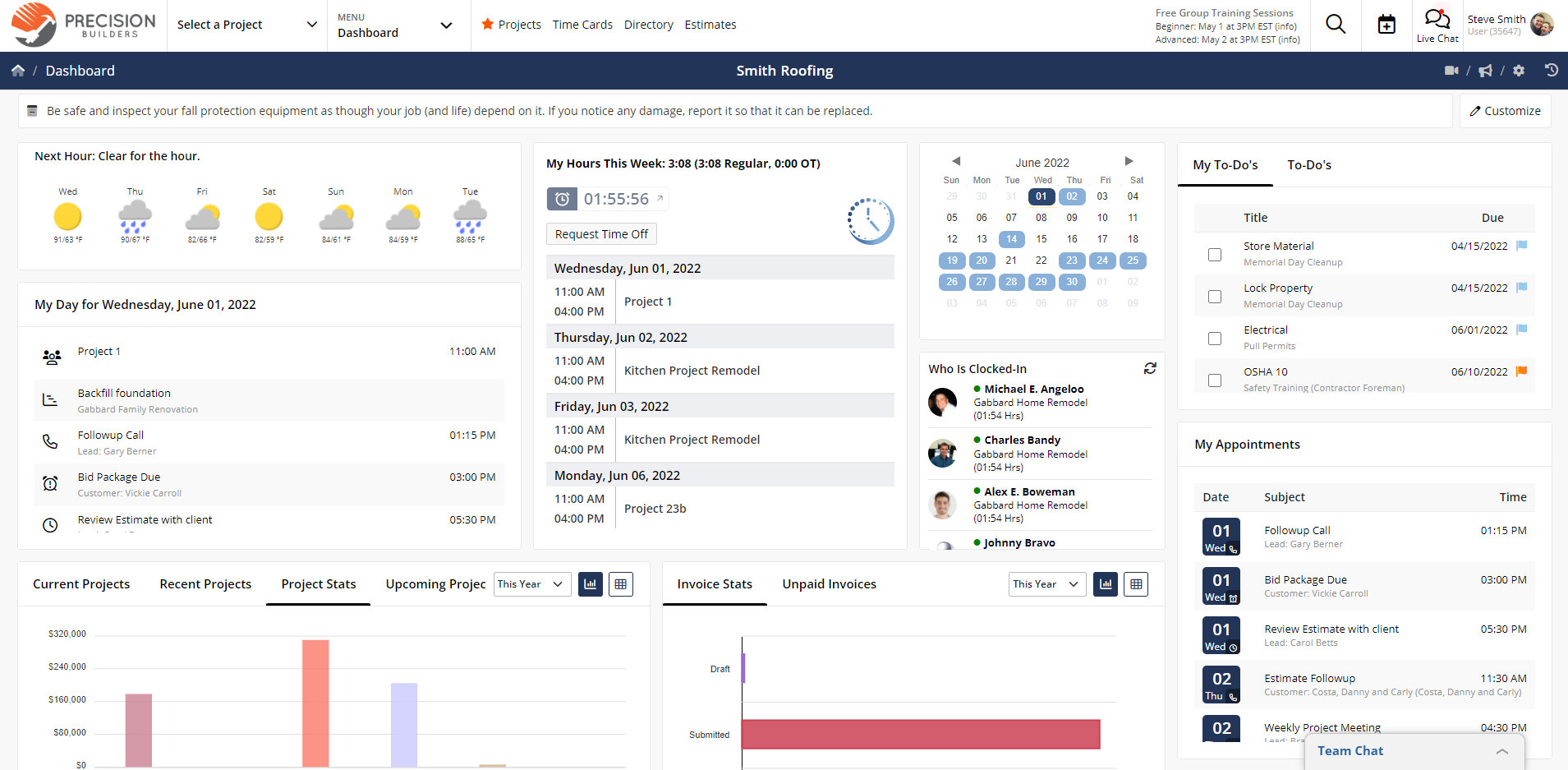
7. Contractor Foreman: Affordable All-in-One for SMBs
Contractor Foreman is an all-in-one construction management platform designed specifically for small to mid-size contractors. It encompasses estimating, scheduling, budgeting, safety, and field reporting within a single tool, often positioned as an affordable Procore alternative due to its tiered flat-rate pricing model.
Contractor Foreman Pros & Key Features:
- Comprehensive suite covering estimating, scheduling, budgeting, safety, and field reporting.
- Tiered flat-rate pricing based on team size, offering predictable costs.
- Includes daily logs, RFIs, submittals, timesheets, change orders, and client portals.
- Offers a 30-day free trial and a 100-day money-back guarantee on annual plans.
- Strong emphasis on affordability for SMBs.
Contractor Foreman Cons & Limitations:
- The user interface may appear dated compared to more modern platforms.
- Tiered pricing by user caps can create challenges when team sizes cross thresholds.
- Reporting is functional but lacks visual polish and advanced customization.
- The extensive feature set can lead to a steeper learning curve than initially advertised.
Contractor Foreman Pricing: Tiered flat-rate plans (e.g., Starter, Standard, Plus, Premium) based on the number of users, rather than per-seat.
Contractor Foreman Reviews: Valued for its comprehensive features at an affordable price, but users sometimes point to the UI and reporting as areas for improvement.
8. Buildxact: Precision Estimating for Residential Builders
Buildxact specializes in estimating software for residential construction projects, offering features like on-screen takeoffs and point-and-click commands to simplify the estimating process. This cloud-based Procore alternative emphasizes accuracy in quoting and project tracking.
Buildxact Pros & Key Features:
- Specialized on-screen takeoff and estimating tools for residential construction.
- Ability to generate accurate quotes and estimates for multiple projects.
- Historical database for improved future estimating accuracy.
- Integrations with accounting software and specific estimating tools (e.g., HVAC).
- Includes project tracking, cost tracking, and basic reporting features.
Buildxact Cons & Limitations:
- Lacks advanced features required by larger companies or complex commercial projects.
- Regional issues may arise due to its Australian origins for global users.
- Some features can be challenging to understand or utilize fully.
- Limited integration ecosystem compared to other broader project management platforms.
Buildxact Pricing: Offers tiered plans (Entry, Pro, Teams) with monthly or annual subscriptions, tailored to different levels of estimating and project management needs.
Buildxact Reviews: Highly regarded by residential builders for its estimating accuracy and ease of use, though its scope is limited to this niche.
9. eSub: Empowering Subcontractors with Specialized Tools
eSub distinguishes itself by focusing solely on the unique needs and challenges of subcontractors across various trades. This mobile and cloud-based Procore alternative streamlines day-to-day operations and connects field workers with office managers, automating key tracking and communication processes.
eSub Pros & Key Features:
- Designed specifically for subcontractors, addressing their unique workflows.
- Automates labor tracking and communication for enhanced efficiency.
- Centralized storage for project documentation, photos, and drawings.
- Tools for creating, logging, and tracking RFIs, change orders, and daily reports.
- Connects field and office teams effectively.
eSub Cons & Limitations:
- Its niche focus means it may be lacking for general contractors or larger project owners.
- Users have reported limited integration with Microsoft products and other common platforms.
- The display platform has been described as dated.
- Some users report bugs, though the company is generally responsive to fixes.
- Despite its subcontractor focus, some users find certain features irrelevant to their specific trade.
eSub Pricing: Generally offered on a per-user basis, with pricing available upon request due to customization for subcontractor needs.

eSub Reviews: Praised by subcontractors for its specialized tools and automation, but noted for its dated interface and some integration gaps.
10. Trimble e-Builder: Capital Project Management and Performance Insights
Trimble e-Builder is a cloud-based construction management software specifically tailored for capital projects. It provides comprehensive insights into project performance throughout the entire lifecycle, aiming to reduce risk, improve efficiency, and generate savings.
Trimble e-Builder Pros & Key Features:
- Specialized for capital projects, offering end-to-end lifecycle management.
- Robust cost management, change management, and procurement features.
- Strong capabilities in capital planning and fund tracking.
- Centralized document management, keeping all conversations and documents in one place.
- Focus on safety assurance and efficient deployment.
Trimble e-Builder Cons & Limitations:
- Can be difficult to use, with a less intuitive interface.
- Limited training resources, and existing training can be challenging to grasp.
- Major disadvantage is the lack of integration with common cloud storage options (iCloud, DropBox).
- High cost, potentially deterring smaller firms or those with fewer capital projects.
Trimble e-Builder Pricing: Enterprise-level pricing, typically customized and available upon direct inquiry, reflecting its focus on large capital projects.
Trimble e-Builder Reviews: Valued for its robust capital project management and document control, but often criticized for its complexity and high cost.
11. Trimble B2W Software: Heavy Civil Construction Specialization

Trimble B2W Software is a specialized construction project management solution built to serve the unique demands of heavy civil construction estimating, operations, and business intelligence. With a track record dating back to 1993, it emphasizes ease of use, deployment, and 24/7 world-class support.
Trimble B2W Software Pros & Key Features:
- Accurate estimating capabilities specifically for heavy civil construction.
- Centralized resource databases for materials, equipment, and labor.
- Seamless integration with accounting software.
- Comprehensive scheduling and work tracking features.
- Employee app for creating and managing work logs and reporting labor hours.
Trimble B2W Software Cons & Limitations:
- Includes an annual maintenance fee that users consider expensive.
- Integration functions, while present, can feel limited or incomplete.
- Estimating, despite being a core strength, can be tedious due to extensive data input requirements and may not be universally effective across all project types.
- Reports are often described as confusing, hindering clear communication with stakeholders.
Trimble B2W Software Pricing: Modular pricing for different components (Estimate, Track, Maintain, Schedule, Inform), with an annual maintenance fee. Specific pricing available upon request.
Trimble B2W Software Reviews: Appreciated for its specialization in heavy civil estimating, but users often raise concerns about the maintenance fee and reporting clarity.
Comparative Analysis and Future Outlook
The market for construction project management software in 2026 is characterized by its diversity, reflecting the varied needs of the industry. While Procore continues to hold a significant presence, the emergence and maturation of these alternatives demonstrate a strong competitive landscape. Firms are no longer limited to a few dominant players but can choose from solutions that prioritize affordability (Contractor Foreman), niche specialization (eSub, Buildxact, Trimble B2W), design-to-build integration (Autodesk), or flexible work management (monday.com, Smartsheet).
The overarching trend points towards software that offers a delicate balance between comprehensive features, intuitive user experience, and cost-effectiveness. The ability to integrate seamlessly with existing digital ecosystems and provide robust mobile capabilities for field operations remains paramount. As project complexity continues to rise, so does the demand for sophisticated yet accessible tools that empower construction professionals at every stage.
The Best Procore Alternative Is Clear
Having examined the top 11 Procore alternatives, the distinction of ProjectManager as a leading solution becomes evident. It effectively addresses the common pain points that drive firms to seek alternatives to Procore, offering a compelling blend of powerful planning, managing, and tracking features. ProjectManager delivers the depth of functionality expected from industry-leading software—including advanced Gantt charts, real-time dashboards, comprehensive resource management, and integrated risk management—at a more competitive price point and with superior ease of use. Its commitment to fostering collaboration through free guest licenses and an intuitive mobile app further cements its position as a highly accessible and effective tool for construction project management.
ProjectManager’s ability to connect diverse teams—whether in the office, on the job site, or anywhere in between—through shared files, task-level comments, and automated workflows, ensures greater collaboration and operational efficiency. For construction companies striving to enhance productivity, control costs, and deliver projects on schedule without compromising quality, ProjectManager offers a robust, user-centric, and economically viable alternative.
ProjectManager is the best Procore alternative for construction project management. Our cloud-based software connects teams in the office, on the job site or anywhere else. They can share files, comment at the task level and more to foster greater collaboration. Plan, manage and track work in real time, automate workflows and set task authorization to ensure quality is delivered. Get started with ProjectManager today for free.
Related posts: