Transforming Supply Chain Visibility into Actionable Decision Workflows with Amazon Quick and NVIDIA NeMo Agent Toolkit

Fast-growing companies and enterprise supply-chain teams are increasingly awash in data, providing clear indicators of disruptions. However, the sheer volume and complexity often outstrip the available time for manual investigation. A single supplier delay, for instance, can trigger a cascade of checks across purchase orders, inventory levels, customer commitments, contract stipulations, logistics capabilities, and approval policies. This intricate web of dependencies makes rapid, informed decision-making a significant challenge. While dashboards offer a vital overview of what is happening, the true hurdle lies in translating these signals into reliable decision workflows that not only recommend the next course of action but also clearly articulate the evidence supporting those recommendations.
This article explores how Amazon Quick, a versatile business-user front door, can be integrated with specialized agent workflows, specifically leveraging the NVIDIA NeMo Agent Toolkit. We demonstrate a practical application within supply-chain risk management, guiding a planner from an Amazon Quick dashboard and contextual knowledge to a concrete, evidence-based mitigation recommendation. This synergy aims to bridge the gap between data visualization and decisive action, empowering organizations to navigate the complexities of modern supply chains with greater agility and confidence.
The Challenge of Supply Chain Disruption
In today’s globalized economy, supply chains are more interconnected and susceptible to disruption than ever before. Geopolitical events, natural disasters, economic fluctuations, and unforeseen logistical snags can all create ripple effects that impact product availability, customer satisfaction, and ultimately, a company’s bottom line. For large organizations managing vast networks of suppliers, manufacturers, distributors, and customers, identifying and responding to these disruptions in real-time is a monumental task.
Traditional approaches often rely on reactive measures, with teams scrambling to address issues only after they have materialized. This reactive stance can lead to significant financial losses due to expedited shipping costs, lost sales, damaged customer relationships, and production downtime. The core problem is not a lack of data, but rather the difficulty in synthesizing that data into actionable insights and automated responses. The manual processes involved in investigating a single disruption can consume valuable hours, during which the situation may further deteriorate.
A Unified Solution: Amazon Quick and NVIDIA NeMo Agent Toolkit
To address these critical challenges, a powerful combination of Amazon Quick and the NVIDIA NeMo Agent Toolkit has been developed. Amazon Quick provides a unified conversational workspace for business users, seamlessly integrating both structured data from dashboards and unstructured enterprise knowledge. This knowledge can be sourced from a variety of repositories, including Amazon Simple Storage Service (Amazon S3), Google Drive, Microsoft SharePoint, Atlassian Confluence, and internal web content. Within this workspace, users can leverage over 100 pre-built action connectors to interact with third-party systems like Microsoft Outlook, Slack, Jira, and Asana. Crucially, it also facilitates the invocation of agentic workflows exposed through the Model Context Protocol (MCP).
The NVIDIA NeMo Agent Toolkit, an open-source, framework-agnostic library, plays a pivotal role in building, evaluating, profiling, and optimizing these agentic workflows. It integrates smoothly with popular frameworks such as LangChain, LlamaIndex, CrewAI, Microsoft Semantic Kernel, and Google ADK, as well as custom Python agents. In this specific supply-chain risk scenario, the solution empowers supply-chain analysts to utilize an Amazon Quick chat agent. This agent orchestrates a NeMo Agent Toolkit workflow, which delves into the root cause of a disruption, interfaces with relevant supply-chain tools, validates proposed solutions, and ultimately delivers a ranked mitigation plan directly to the planner.
This approach offers significant benefits across various roles within an organization. Supply-chain operations leaders, analysts, and builders can transition from simply observing data on dashboards to actively engaging in guided mitigation planning. Engineering leaders and developers gain the capability to construct robust backend agentic workflows using the NeMo Agent Toolkit, while Amazon Quick serves as the intuitive front-end for business users. For startups, this architecture provides a scalable solution to manage growing operational complexities without the need for proportional increases in planning staff. As order volumes, supplier networks, and customer commitments expand, this adaptable framework ensures that supply-chain decisions remain swift and consistent.
Furthermore, the NVIDIA NeMo Agent Toolkit provides essential tools for inspecting and evaluating agentic workflows. Through telemetry, per-step latency metrics, and evaluation results, teams can fine-tune workflow logic, optimize tool performance, and enhance orchestration strategies. This level of observability is paramount as organizations evolve from basic chat assistants to sophisticated agentic systems capable of handling complex decision-making processes.
Architectural Blueprint for Intelligent Supply Chain Management
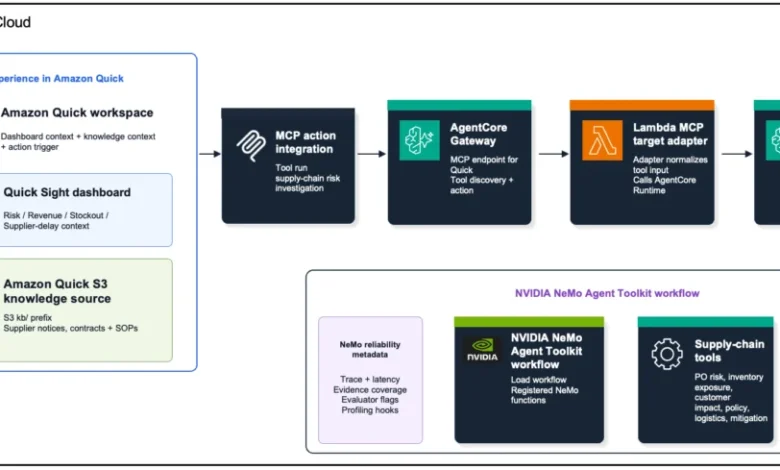
The architecture underpinning this solution is designed for seamless integration and efficient operation. Amazon Quick serves as the primary interface for business users, providing access to dashboards, knowledge context, and the ability to trigger actions. Amazon Bedrock AgentCore acts as the crucial bridge, offering the MCP gateway and runtime hosting for the agentic workflows. The NeMo Agent Toolkit is the engine driving the backend agentic workflow, responsible for registering tools, orchestrating the intricate supply-chain investigation process, capturing execution traces, and supporting the evaluation and profiling necessary for iterative improvement.
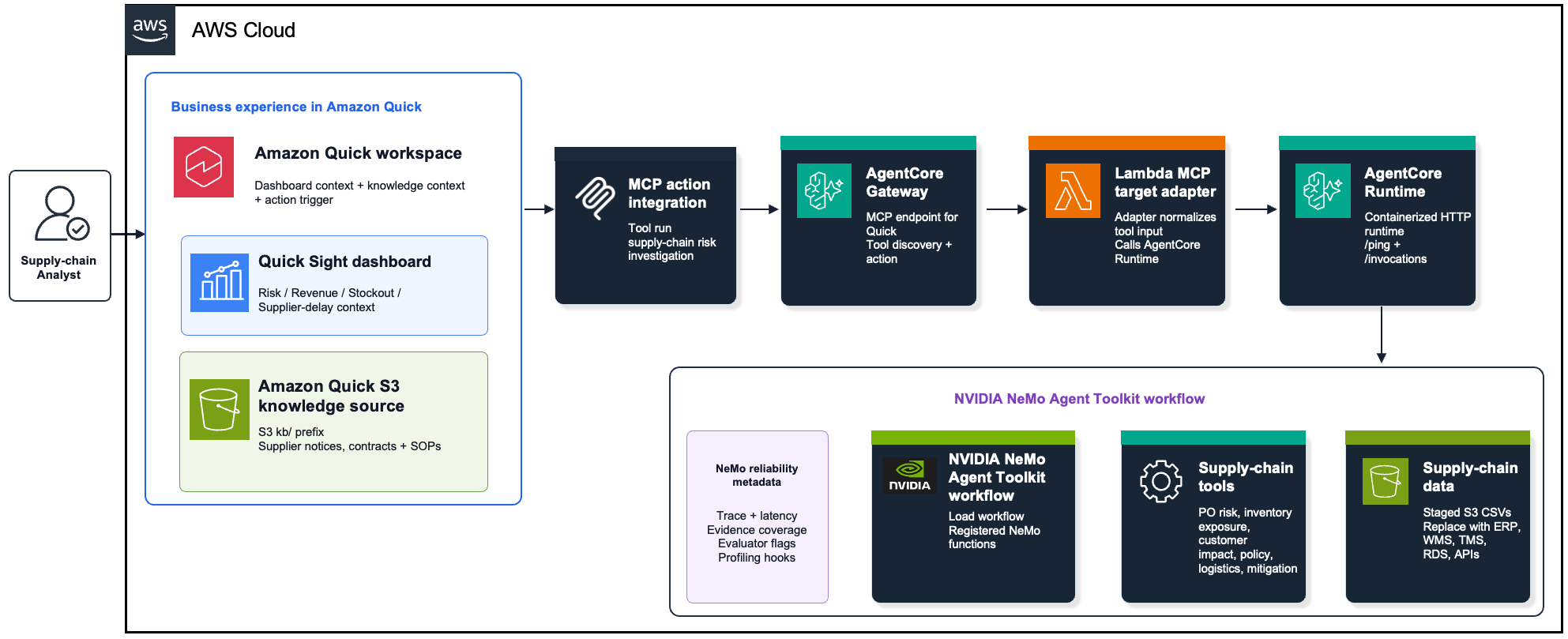
Figure 1 visually depicts the interplay between Amazon Quick, AgentCore Gateway, AgentCore Runtime, and the NeMo Agent Toolkit workflow. Amazon Quick presents the dashboard view, aggregates knowledge, and initiates actions. AgentCore Gateway exposes the MCP action, allowing external systems to interact with the backend. AgentCore Runtime hosts the containerized NeMo Agent Toolkit workflow, executing the complex logic.
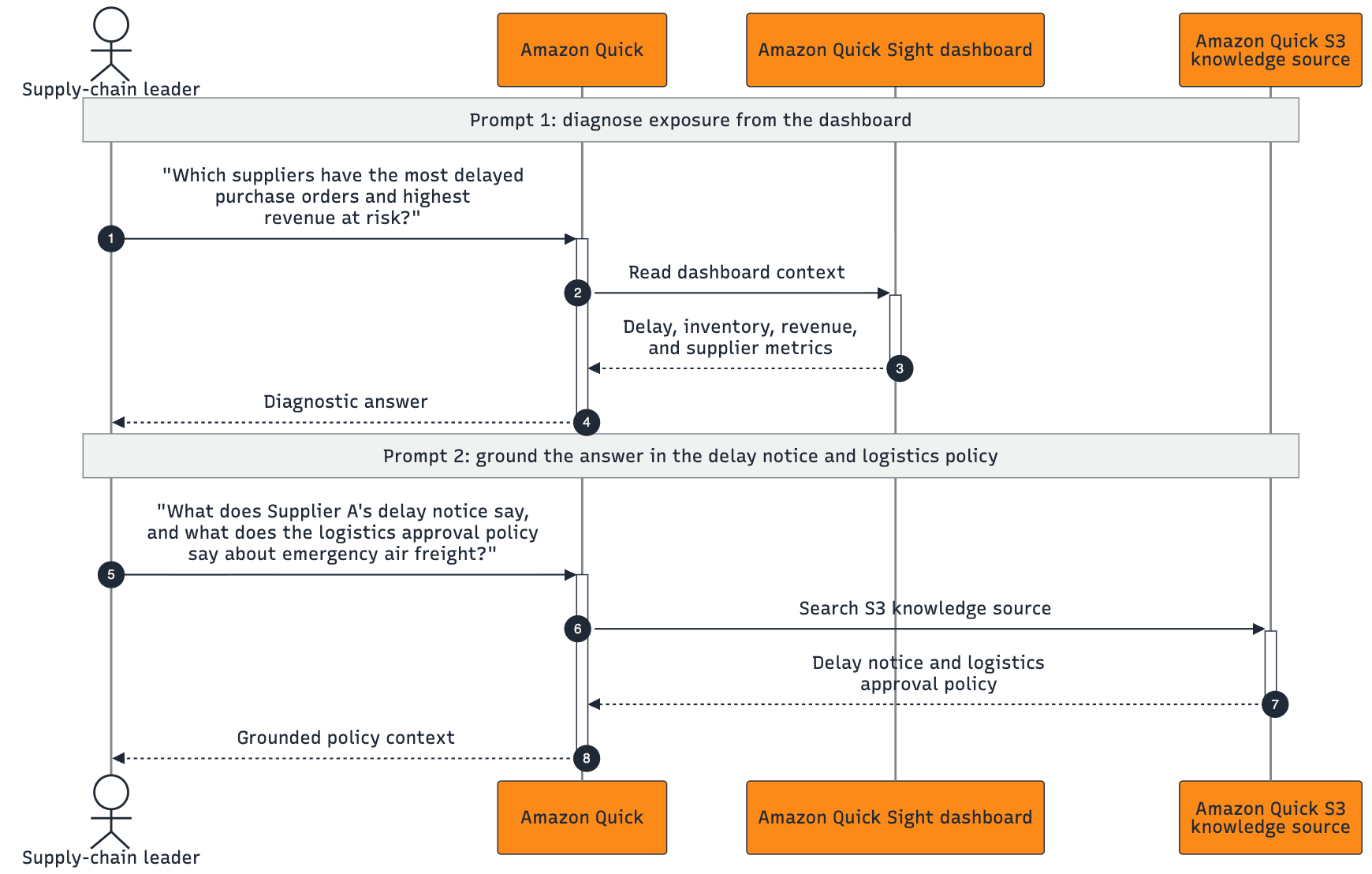
The user interaction model is bifurcated into two distinct patterns. Initially, an analyst can pose diagnostic questions. Amazon Quick, leveraging its access to dashboards and knowledge sources like Amazon S3, can directly answer queries such as "What is happening?". This diagnostic phase is illustrated in Figure 2, where Amazon Quick effectively uses dashboard data and contextual knowledge to address immediate "what is happening?" inquiries before any backend action is invoked.
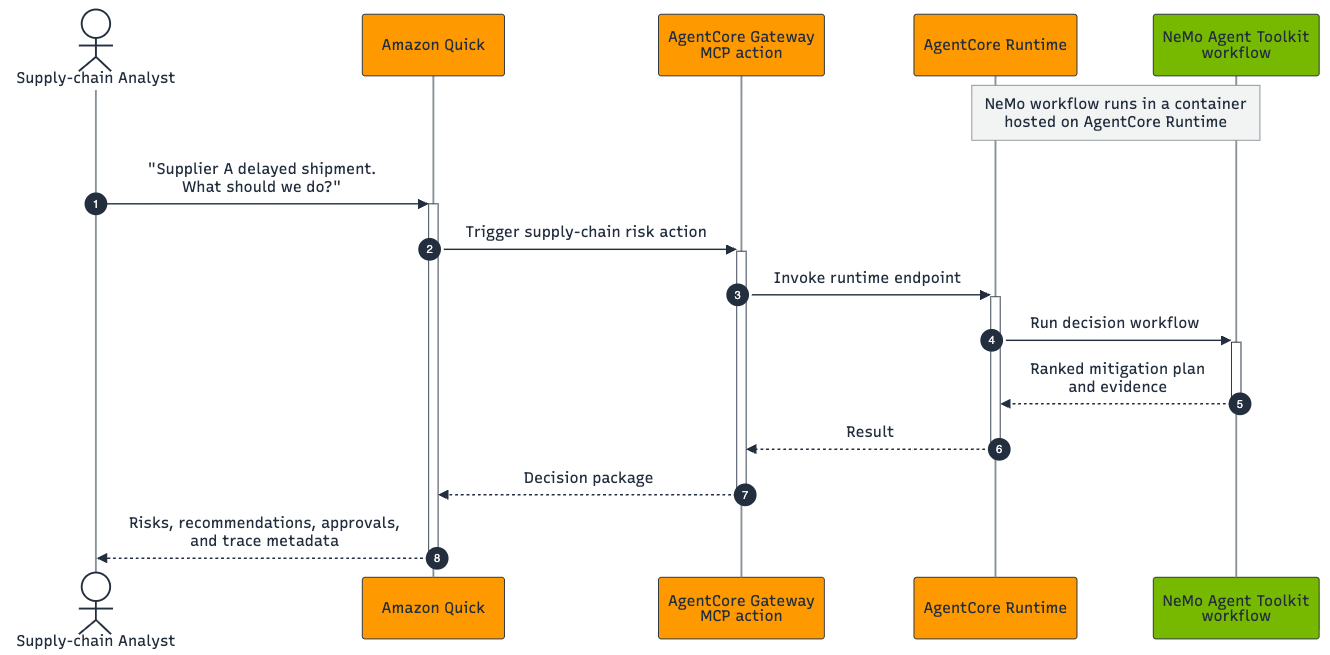
The second pattern emerges when the analyst seeks guidance on the next steps. At this juncture, Amazon Quick invokes the NeMo-backed MCP action. This is visually represented in Figure 3, where Amazon Quick triggers the MCP action, AgentCore routes the request to the appropriate runtime, and the NeMo toolkit executes the backend decision workflow to generate a comprehensive mitigation plan.
For those new to the NVIDIA NeMo Agent Toolkit, understanding its internal structure is key. The backend workflow comprises three primary code layers: registered functions, a workflow configuration file, and an orchestrator. Registered functions are modular, reusable capabilities designed to perform specific tasks, such as assessing purchase order risks, evaluating inventory exposure, calculating customer impact, looking up contract rules, identifying logistics options, and generating mitigation recommendations. The workflow configuration file defines these functions and orchestrates their execution into a cohesive decision-making sequence. Finally, the orchestrator receives incoming requests, directs the sequential execution of functions, and returns the final mitigation plan, complete with supporting evidence and performance metadata.
Implementation Roadmap: From Deployment to Action
The accompanying repository provides a comprehensive set of resources for deploying and testing this solution, including AWS CloudFormation templates for infrastructure provisioning, deployment scripts, sample data, the NeMo Agent Toolkit workflow plugin, and detailed setup instructions for Amazon Quick.
Prerequisites for Deployment
To successfully deploy and test this sample solution, users will need:
- An active AWS account.
- Appropriate AWS credentials configured for the chosen region.
- The AWS Command Line Interface (CLI) installed and configured.
- Python 3.12 or a compatible version installed.
- Git installed for repository cloning.
Step-by-Step Deployment Guide
Step 1: Clone the Repository
Begin by cloning the provided GitHub repository to your local machine. This action will download all necessary deployment scripts, CloudFormation templates, sample data, and the NeMo Agent Toolkit workflow code.
git clone https://github.com/aws-samples/sample-amazon-quick-nvidia-nemo-agent-toolkit
cd amazon-quick-nemo-supply-chain-risk
Step 2: Authenticate to AWS
Ensure you are authenticated to the AWS account where you intend to deploy the solution. This typically involves configuring an IAM Identity Center (SSO) profile, initiating a browser-based sign-in, setting the active CLI profile, and verifying your account identity.
For Mac or Linux:
aws configure sso
aws sso login --profile <your-profile-name>
export AWS_PROFILE=<your-profile-name>
aws sts get-caller-identity
For Windows PowerShell:
aws configure sso
aws sso login --profile <your-profile-name>
$env:AWS_PROFILE="<your-profile-name>"
aws sts get-caller-identity
The aws sso login command will initiate an authentication flow in your browser. Utilize your existing AWS SSO session if available. Confirm that the returned AWS account is the correct one for deployment.
Step 3: Deploy the Sample Solution
Define the AWS Region and a descriptive stack name for your deployment. The Region dictates where the infrastructure will be provisioned, and the stack name helps in organizing and managing the generated resources for later cleanup.
For Mac or Linux:
export AWS_REGION=us-east-1
export STACK_NAME=sc-risk-copilot-dev
./scripts/deploy.sh
For Windows PowerShell:
$env:AWS_REGION="us-east-1"
$env:STACK_NAME="sc-risk-copilot-dev"
.scriptsdeploy.ps1
The deployment script automates several key tasks, including:
- Creating an S3 bucket for storing sample data and dashboard assets.
- Provisioning an Amazon Bedrock AgentCore Gateway and Runtime environment.
- Setting up an IAM role for the NeMo Agent Toolkit workflow.
- Deploying the NeMo Agent Toolkit workflow as a containerized service within the AgentCore Runtime.
- Configuring the AWS CloudFormation stack to manage all deployed resources.
Following the infrastructure deployment, refer to steps 5 through 7 for guidance on configuring the Amazon Quick dashboard, knowledge source, chat agent, and MCP action connection.
Inside the NeMo Agent Toolkit Workflow
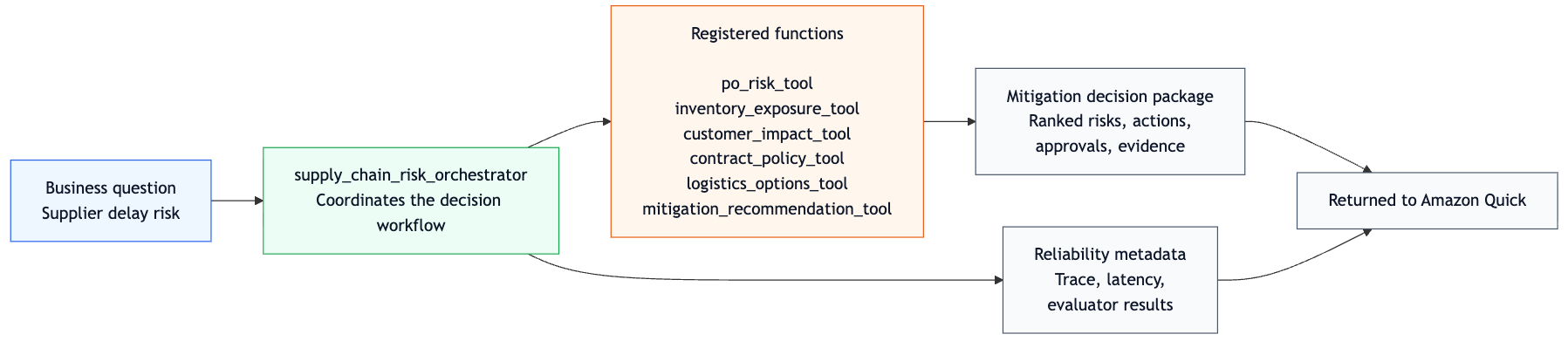
The NeMo Agent Toolkit workflow operates within an Amazon Bedrock AgentCore Runtime container. Amazon Quick initiates interactions with this workflow via the Amazon Bedrock AgentCore Gateway, which then routes requests through a Lambda target adapter to the runtime endpoint. Within the container, FastAPI handles incoming /invocations requests and loads the NeMo Agent Toolkit workflow. The core of this workflow is the supply_chain_risk_orchestrator, which orchestrates six distinct registered functions: purchase order risk assessment, inventory exposure evaluation, customer impact calculation, contract policy lookup, logistics options identification, and mitigation recommendation generation. This orchestration results in a ranked mitigation plan, accompanied by detailed evidence, trace information, latency metrics, and evaluator metadata, all returned to Amazon Quick.
Figure 4 provides a detailed view of the NeMo Agent Toolkit workflow operating within the runtime container. The orchestrator efficiently coordinates the six specialized supply-chain functions, delivering both the decision package and reliability metadata back to Amazon Quick.
NeMo Agent Toolkit Workflow Configuration
The underlying decision logic is formalized through a NeMo Agent Toolkit workflow configuration. This YAML-defined structure assigns local names to registered functions and specifies their sequence of execution. The orchestrator then resolves these configured functions within its Python registration code. For in-depth details, consult the NeMo Agent Toolkit documentation on custom functions.
# Each entry under functions configures a function available to the workflow
# The _type value maps to a registered NeMo function in the plugin code.
functions:
  po_risk:
    _type: po_risk_tool
  inventory_exposure:
    _type: inventory_exposure_tool
  customer_impact:
    _type: customer_impact_tool
  contract_policy:
    _type: contract_policy_tool
  logistics_options:
    _type: logistics_options_tool
  mitigation_recommendation:
    _type: mitigation_recommendation_tool

# The workflow section defines the entry point and wires in the functions.
workflow:
  _type: supply_chain_risk_orchestrator
  po_risk_fn: po_risk_tool
  inventory_fn: inventory_exposure_tool
  customer_impact_fn: customer_impact_tool
  contract_policy_fn: contract_policy_tool
  logistics_fn: logistics_options_tool
  mitigation_fn: mitigation_recommendation_tool
This explicit configuration enhances the workflow’s testability, allowing for instrumentation, reuse, and integration into NeMo Agent Toolkit’s evaluation and profiling pipelines. For production environments, the sample CSV-backed functions should be replaced with robust, governed data tools such as Amazon Athena queries, RDS queries, ERP APIs, WMS/TMS APIs, or other MCP-enabled services.
Step 4: Review the Outputs
After deployment, examine the generated setup file located at amazon-quick-nemo-supply-chain-risk/outputs/quick-setup.txt. This file contains crucial information, including the Amazon S3 location of the dashboard CSV, the S3 prefix for knowledge documents, the S3 prefix for evaluation data, the AgentCore Gateway MCP endpoint URL, authentication guidance for the demo, and suggested prompts for testing in Amazon Quick.
Step 5: Create the Amazon Quick Sight Dashboard
Utilize the pre-processed CSV dataset found at amazon-quick-nemo-supply-chain-risk/sample-data/quick/supply_chain_risk_view.csv. This file is also staged in the S3 bucket provisioned by AWS CloudFormation. You can retrieve the S3 path from the outputs/quick-setup.txt file. To use the deployed version, download it first:
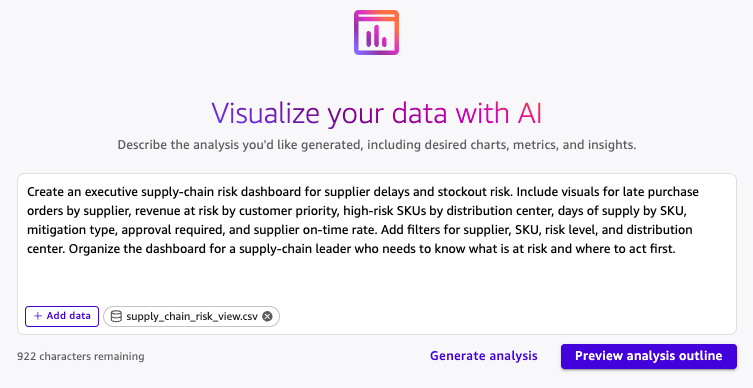
aws s3 cp s3://<data-bucket>/quick/supply_chain_risk_view.csv ./supply_chain_risk_view.csvWithin Amazon Quick, navigate to "Analyses," select "Generate analysis," then "add data," "create a dataset," and finally "upload" the supply_chain_risk_view.csv file. Figure 5 illustrates the "Generate analysis" interface with a sample dashboard prompt.
Use the following prompt to generate a comprehensive supply-chain risk dashboard:
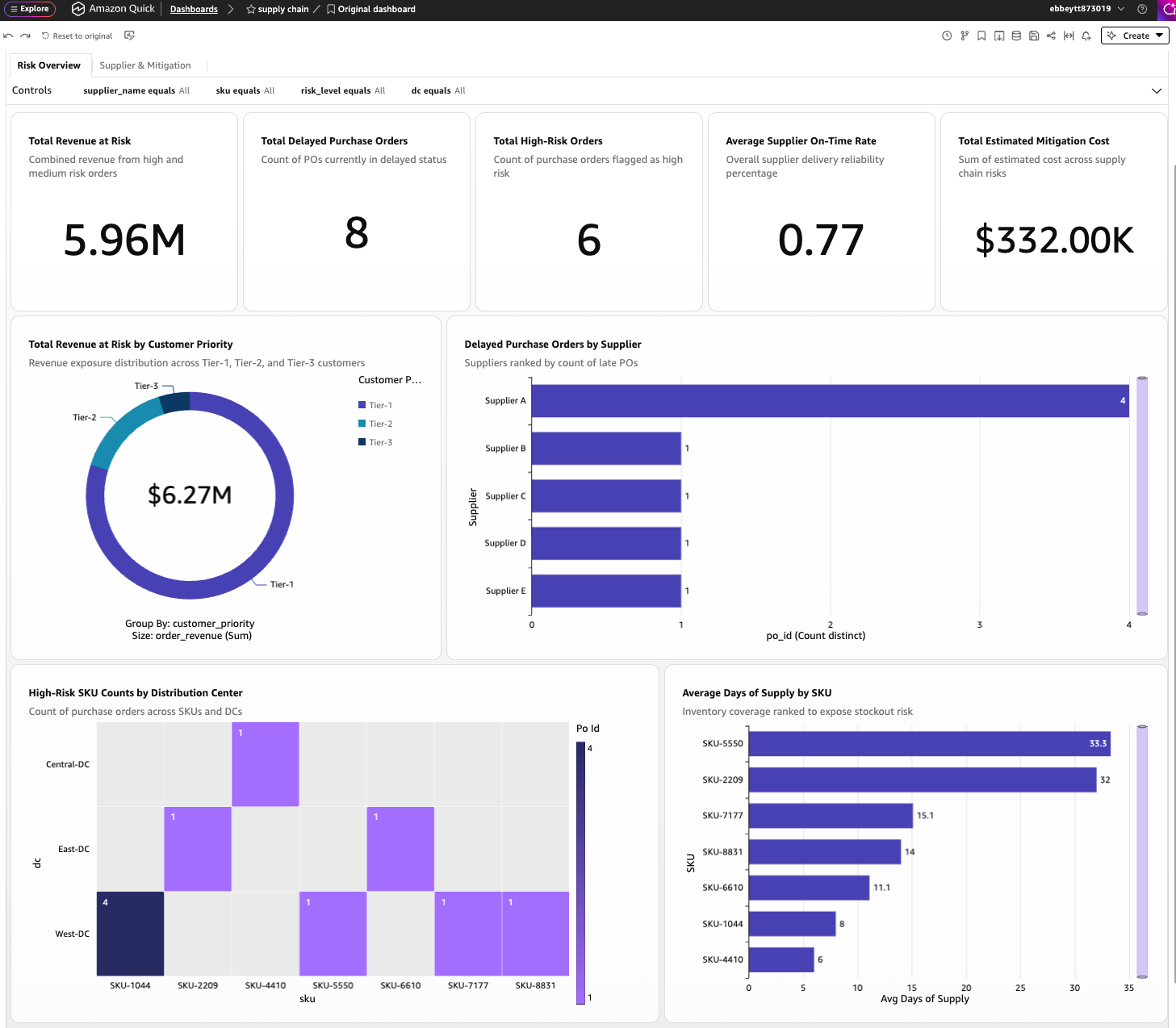
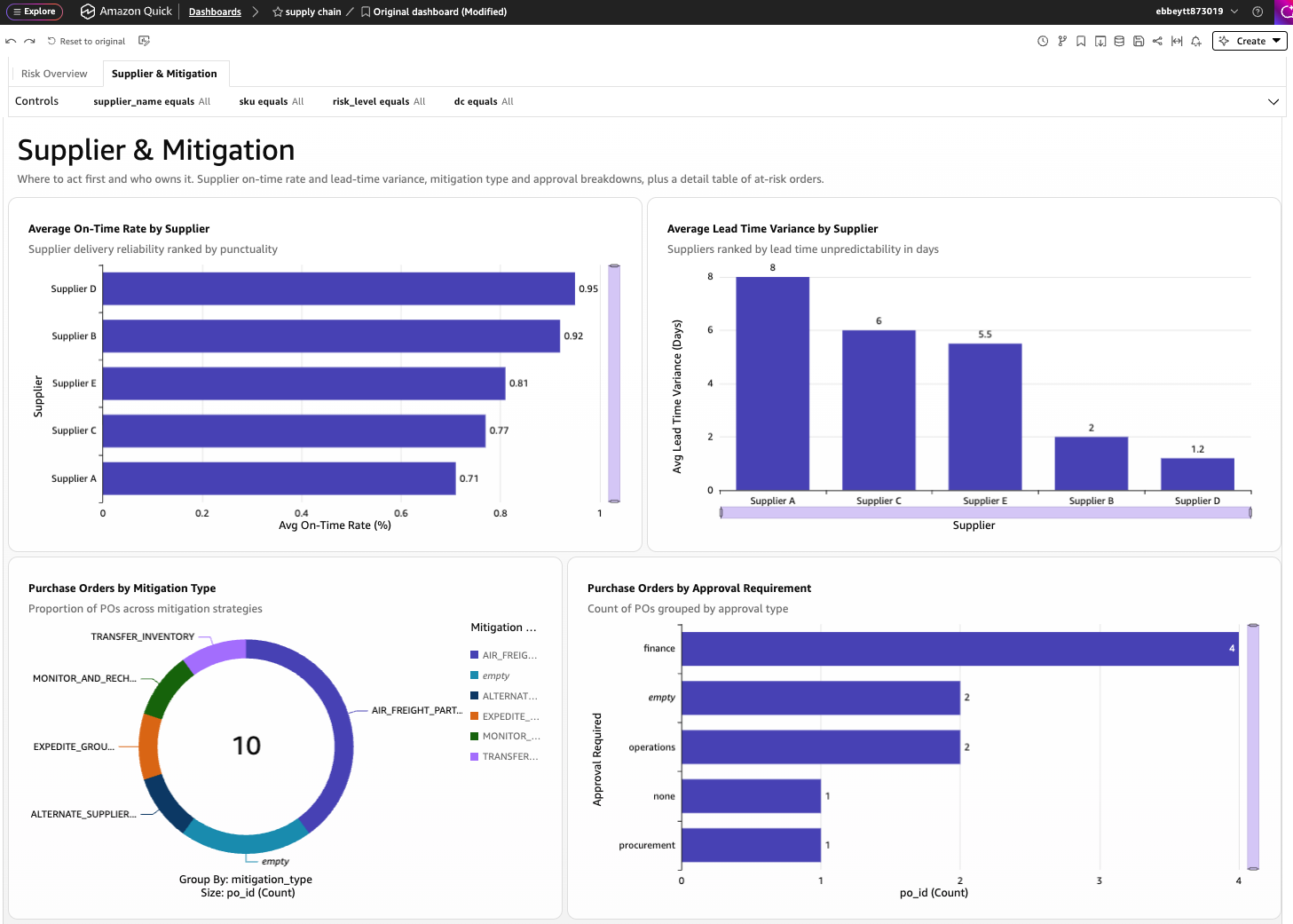
Create an executive supply-chain risk dashboard for supplier delays and stockout risk. Include visuals for late purchase orders by supplier, revenue at risk by customer priority, high-risk SKUs by distribution center, days of supply by SKU, mitigation type, approval required, and supplier on-time rate. Add filters for supplier, SKU, risk level, and distribution center. Organize the dashboard for a supply-chain leader who needs to know what is at risk and where to act first.After previewing the analysis outline and choosing "Generate," you will have a dashboard with visualizations such as those shown in Figures 6 and 7, providing an overview of revenue at risk, delayed orders, critical SKUs, and supplier exposure, alongside a view comparing supplier delay performance and mitigation options.
Step 6: Establish the Knowledge Source for Amazon Quick
The knowledge source empowers the chat agent with access to unstructured contextual information, such as supplier advisories, contract clauses, logistics approval policies, and customer service level agreements.
In Amazon Quick:
- Navigate to Knowledge bases.
- Select Create knowledge base.
- Provide a name, such as "Supply Chain Policies."
- Choose Amazon S3 as the data source.
- Enter the S3 prefix for knowledge documents obtained from the
outputs/quick-setup.txtfile. - Configure the embedding model and vector store as per the deployment output.
- Select Sync to ingest the documents.
Step 7: Register the NeMo Agent Toolkit Workflow as an MCP Action in Amazon Quick
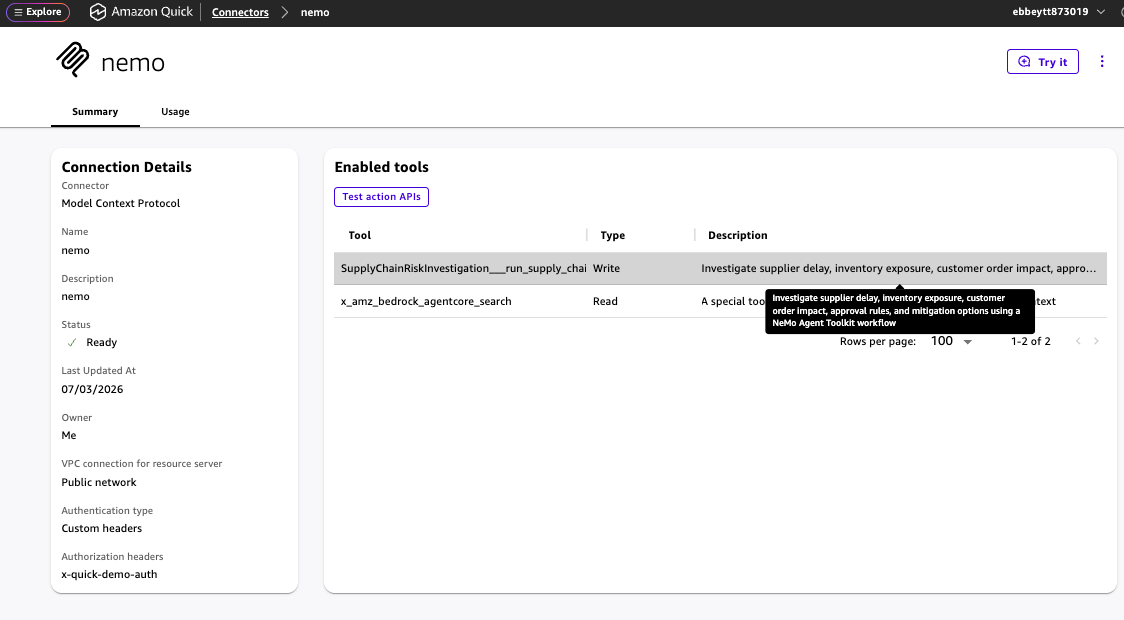
The MCP action serves as the critical link between Amazon Quick and the NeMo Agent Toolkit workflow running on AgentCore Runtime. Figure 8 displays a registered MCP integration, highlighting the enabled supply-chain risk action.
Important Security Note: This sample deploys AgentCore Gateway with AuthorizerType=NONE, which bypasses authentication and authorization. It is strictly for private, isolated demo environments with synthetic data. In production, implement a robust authorizer like CUSTOM_JWT and configure Amazon Quick user or service OAuth authentication.
In Amazon Quick:
- Navigate to Actions.
- Select Create action.
- Choose Amazon Bedrock AgentCore Gateway as the integration type.
- Enter the Gateway URL from
outputs/quick-setup.txt. - Specify the Action group as "SupplyChainRisk" and the Action name as "InvestigateSupplyChainRisk."
- Provide a descriptive summary for the action.
- Configure the action’s input and output schemas, referencing the NeMo Agent Toolkit workflow’s expected parameters and return types.
Demo Placeholder Warning: The provided Gateway configuration is for demonstration purposes only and does not perform validation. For production, ensure AgentCore Gateway is configured with a production-ready authorizer and requires authenticated access.
Step 8: Create a Supply Chain Risk Chat Agent in Amazon Quick
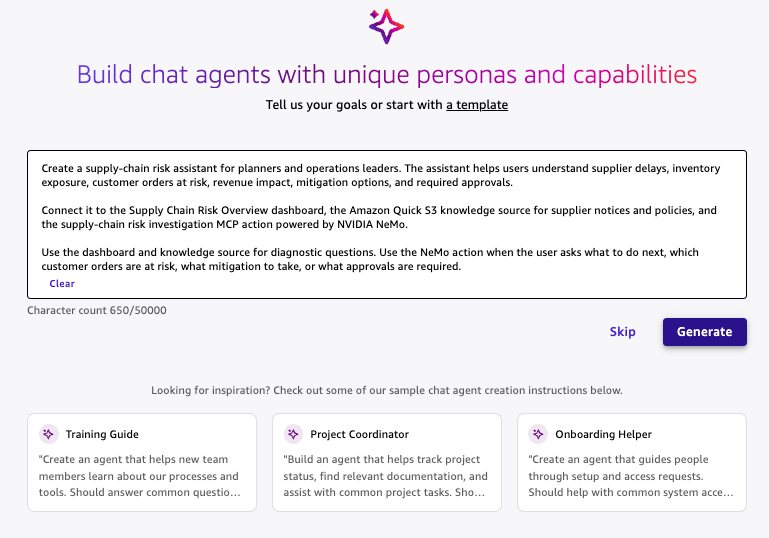
A chat agent consolidates access to the dashboard, knowledge source, and the NeMo-backed action, providing a unified interface for analysts. Figure 9 shows the chat agent creation screen.
Use the following summary:
Create a supply-chain risk assistant for planners and operations leaders. The assistant helps users understand supplier delays, inventory exposure, customer orders at risk, revenue impact, mitigation options, and required approvals. Connect it to the Supply Chain Risk Overview dashboard, the Amazon Quick S3 knowledge source for supplier notices and policies, and the supply-chain risk investigation MCP action powered by NVIDIA NeMo Agent Toolkit. Use the dashboard and knowledge source for diagnostic questions. Use the NeMo action when the user asks what to do next, which customer orders are at risk, what mitigation to take, or what approvals are required.After agent creation, verify its association with the Supply Chain Risk Overview dashboard, the Amazon Quick S3 knowledge source, and the supply-chain risk MCP action. If the knowledge source is not attached, add it via the chat agent configuration pane.
Testing the End-User Workflow
The final step involves testing the integrated workflow through a series of prompts designed to showcase the distinct capabilities of the system.
Prompt 1: Query the Dashboard
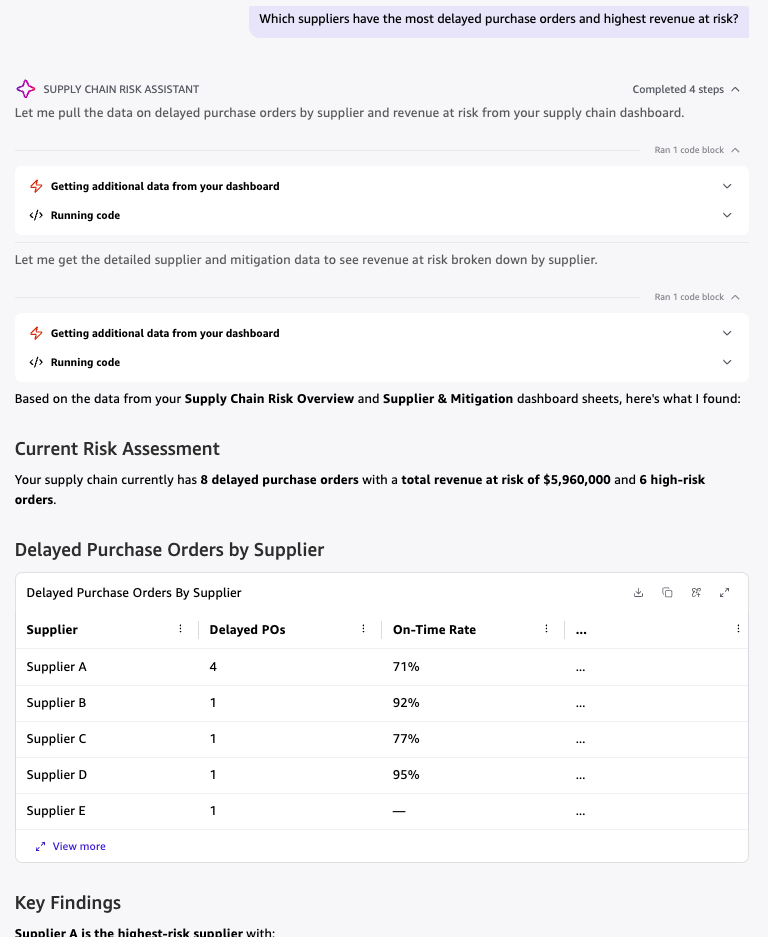
Which suppliers have the most delayed purchase orders and highest revenue at risk?Expected Result: Amazon Quick responds by analyzing the Amazon Quick Sight dashboard, providing a summary of supplier delay performance, inventory exposure, and revenue at risk, as depicted in Figure 10. This response is generated directly from the dashboard data without invoking the NeMo action.
Prompt 2: Query the Knowledge Source
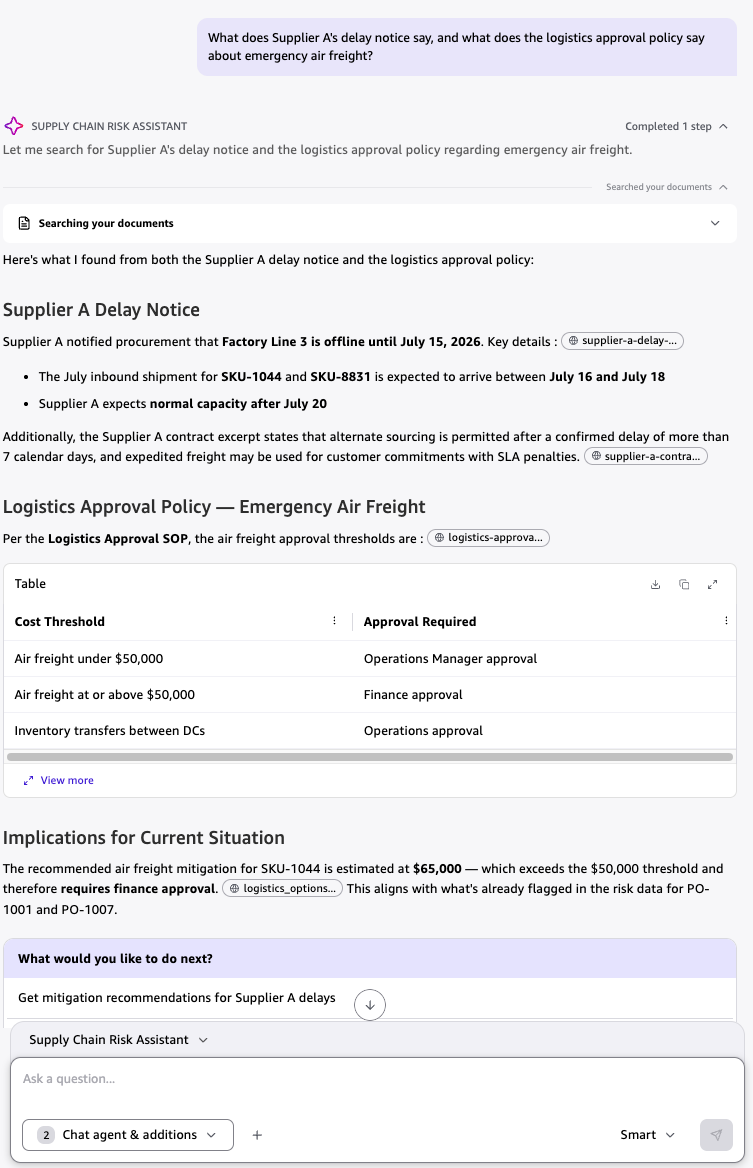
What does Supplier A's delay notice say, and what does the logistics approval policy say about emergency air freight?Expected Result: Amazon Quick consults the Amazon S3 knowledge source to provide a summary of the supplier notice and the logistics approval standard operating procedure (SOP) for emergency air freight, as illustrated in Figure 11. This demonstrates the system’s ability to retrieve and synthesize information from unstructured documents.
Prompt 3: Trigger the NeMo Action
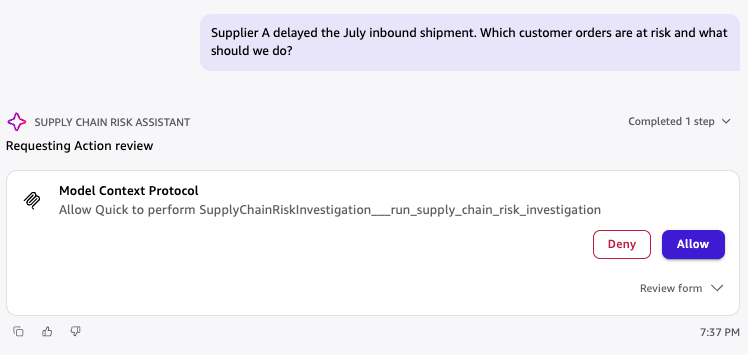
Supplier A delayed the July inbound shipment. Which customer orders are at risk and what should we do?Expected Result: Amazon Quick initiates the NeMo-backed MCP action. Before execution, it presents an action approval prompt (Figure 12). Upon approval, the NeMo workflow investigates the disruption, consults supply-chain tools, validates recommendations, and returns a ranked mitigation plan. For the Supplier A scenario, a successful response identifies three aggregated risk items: SKU-1044 at high risk (requiring partial air freight and finance approval), SKU-8831 at high risk (suggesting an inventory transfer and operations approval), and SKU-7177 at medium risk (recommending monitoring and rechecking). This comprehensive response is shown in Figure 13.
Step 10: Inspect NeMo Trace, Latency, and Evaluation Results
For developers and reviewers, inspecting the backend NeMo Agent Toolkit workflow provides valuable insights. This involves analyzing the workflow’s execution path (trace), the time taken by each component (latency), and the accuracy of its decisions against predefined benchmarks (evaluation results).
Inspecting Runtime Trace and Latency
Execute the following command from the repository root:
export AWS_REGION=us-east-1
export STACK_NAME=sc-risk-copilot-dev
./scripts/inspect-runtime.sh
This will generate outputs/runtime-response.json and outputs/runtime-summary.txt. The runtime-response.json file contains the detailed NeMo Agent Toolkit workflow output, including trace, latency, evidence coverage, evaluator flags, identified risks, recommendations, and approval routing.
Start by examining the trace array to confirm the sequence of registered functions executed, such as purchase order risk lookup, inventory exposure, and so on. Sorting the latency fields from highest to lowest helps identify performance bottlenecks. The slowest tool is a prime candidate for optimization, perhaps through caching, query refinement, or data aggregation. These per-step timings serve as crucial profiling hooks for workflow optimization.
Running the NeMo Agent Toolkit Eval Harness
A lightweight local evaluation harness is provided to assess workflow performance.
PYTHON_CMD=python3.12 ./scripts/eval-nemo-local.shThis script generates outputs/local-eval-report.json. The evaluation dataset (sample-data/eval/supply_chain_eval.jsonl) contains test cases designed to verify the accuracy of risk levels, mitigation actions, approval routes, and evidence coverage. Analyzing local-eval-report.json involves reviewing the overall pass/fail status and then delving into case-level evaluator outputs to identify discrepancies between expected and actual results. These failing cases provide direct feedback for adjusting tool logic, policy data, or critic rules.
Visualizing Results in Amazon Quick
To visualize the evaluation artifacts, upload the generated JSON files (outputs/runtime-response.json and outputs/local-eval-report.json) into the same Amazon Quick chat where you tested the supply-chain action. Then, prompt Quick:
Using the uploaded runtime-response.json and local-eval-report.json files, create a dashboard-style visual summary of the NeMo Agent Toolkit workflow trace, latency, risk recommendations, evidence coverage, evaluator flags, and eval pass/fail results.Amazon Quick can transform these JSON artifacts into an insightful visual summary. Figure 14 presents a sample visualization of per-tool execution time, illustrating that in a specific run, the NeMo Agent Toolkit workflow completed in 657 milliseconds, with PO risk lookup (267 ms) and contract policy retrieval (196 ms) accounting for over 70% of the total latency. This visual breakdown aids in pinpointing performance bottlenecks within the orchestration pipeline.
Security Considerations for Production Environments
The provided sample solution is designed for demonstration purposes. For production deployments, robust security measures are imperative. Key recommendations include:
- Implement Authentication and Authorization: Configure AgentCore Gateway with a production-ready authorizer (e.g.,
CUSTOM_JWT) and enforce OAuth/OIDC-based user or service authentication in Amazon Quick. - Secure Data Access: Ensure all data access, whether through S3, databases, or APIs, adheres to the principle of least privilege.
- Network Security: Utilize Amazon Virtual Private Cloud (VPC) configurations and security groups to restrict network access to deployed resources.
- Encryption: Encrypt data at rest and in transit using AWS services like AWS Key Management Service (KMS).
- Regular Auditing: Implement comprehensive logging and auditing of all system activities to detect and respond to potential security incidents.
Resource Cleanup
To remove the deployed resources and avoid ongoing charges, execute the following command:
For Mac or Linux:
export STACK_NAME=sc-risk-copilot-dev
./scripts/cleanup.sh
For Windows PowerShell:
$env:STACK_NAME="sc-risk-copilot-dev"
.scriptscleanup.ps1
The Amazon S3 bucket created by the CloudFormation template will be retained. Manually empty and delete it if it was only intended for temporary use during the demo.
Conclusion
This comprehensive exploration has demonstrated how the synergy between Amazon Quick and the NVIDIA NeMo Agent Toolkit can effectively transform raw supply-chain visibility into a sophisticated, guided decision-making workflow. Planners benefit from a governed business workspace that integrates dashboards, contextual knowledge, intelligent chat agents, and seamless action triggering. The NVIDIA NeMo Agent Toolkit powers the backend decision engine, providing invaluable trace, latency, and evaluation metadata that enables teams to identify performance bottlenecks, diagnose failures, and refine workflows prior to production deployment.
This architectural pattern holds significant promise for both startups and established enterprises seeking to scale their operational decision-making capabilities. By automating and guiding responses to disruptions, organizations can mitigate risks and enhance efficiency without incurring the costs of expanding manual review processes. The underlying architecture is highly adaptable and can be readily applied to other critical business domains, including customer renewal risk assessment, incident response management, manufacturing quality control, and logistics exception handling, paving the way for more resilient and agile business operations across the board.