From Spreadsheet to Silicon: Reconstructing the Foundations of Early Digital Signal Processor Bring-Up and Modern x86 Assembly

In the early 2000s, the landscape of hardware engineering was defined by a race against time and the constant evolution of internal tooling. As digital signal processors (DSPs) became increasingly sophisticated, their proprietary instruction sets often outpaced the development of the software debuggers and assemblers required to test them. During this era of rapid innovation, engineers were frequently forced to innovate at the grassroots level, turning to unconventional software—most notably Microsoft Excel—to bridge the gap between abstract instruction sets and functional silicon. This practice, while born of necessity, provided a foundational understanding of how machine code interacts with hardware, a pedagogical approach that is being revisited today through modern tools like LibreOffice Calc to demystify the Portable Executable (PE) format for a new generation of developers.
The DSP Bring-Up Era: Engineering Under Constraint
The early 2000s represented a volatile and high-stakes period for semiconductor firms. When a new DSP ASIC was fabricated, the "bring-up" phase—the process of verifying that the chip could execute instructions and interface with external memory—was the ultimate bottleneck. Frequently, the hardware team, the assembler/disassembler team, and the software debugging team were operating in parallel, often separated by city blocks or organizational silos.
During this phase, engineers did not require the full suite of modern developer tools. A complete assembler was often overkill. Instead, the immediate requirement was for a mechanism to execute elementary operations: establishing loops, managing jumps, and, most importantly, toggling I/O pins through memory-mapped registers. Spreadsheet software became the de facto tool for these tasks. By using a spreadsheet to calculate instruction words from the fields of a given instruction set, engineers could manually generate the hexadecimal opcodes required to initialize hardware before formal assembly tools were fully functional. This methodology transformed the spreadsheet into a primitive but effective bridge, allowing testing to proceed even while the primary software development kit remained under construction.
Decoding the Mechanics of the Portable Executable
The Portable Executable (PE) format is the cornerstone of Windows-based software execution. It acts as a comprehensive container that dictates how the operating system loads a program into memory, where execution begins, and how the program interacts with system libraries like kernel32.dll. Despite its complexity, the underlying structure is essentially a series of well-defined headers and data sections.

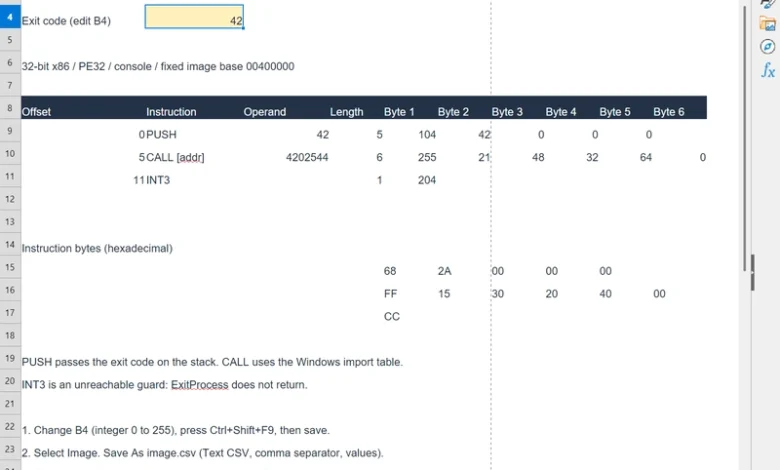
To understand how a spreadsheet can function as a modern assembler, one must understand the relationship between the raw bytes of a file and the machine instructions recognized by an x86 processor. When an engineer inputs a value—such as the decimal integer 42—into a spreadsheet cell, the workbook uses fixed instruction templates to translate that value into machine code. For instance, the x86 instruction PUSH 42 is encoded as the byte sequence 68 2A 00 00 00. In this sequence, 68 serves as the opcode for the "push" operation, while the subsequent four bytes represent the value 42 in little-endian format.
This translation process highlights a critical aspect of low-level programming: the distinction between file offsets and relative virtual addresses. When an executable is saved, the raw bytes generated by the spreadsheet are placed at a specific file offset. However, when Windows loads that executable, it maps those bytes to a specific memory address based on the base address defined in the PE header. The spreadsheet-based assembler approach makes these mechanics transparent, requiring the developer to manually define the headers that point to the entry point of the code, thereby demystifying the "magic" of how a file becomes a running process.
Chronology and Methodology of the Modern Spreadsheet Assembler
The recent resurgence of this technique, facilitated by open-source spreadsheet software like LibreOffice Calc, serves as a bridge to historical engineering practices. The workflow typically follows a structured, three-part chronology:
- Instruction Template Definition: The user establishes a template within the spreadsheet where specific cells act as fields for instructions and operands. Formulas in the spreadsheet then calculate the resulting machine code in both decimal and hexadecimal formats.
- Artifact Generation: Once the instructions are defined, the spreadsheet is exported as a CSV file. A lightweight PowerShell script then reads this CSV, converting the text-based hexadecimal representations into a raw binary format that adheres to the strict layout requirements of a Windows executable.
- Verification and Execution: The final binary is executed directly within the Windows environment. Because the program is designed to call basic system functions—such as
ExitProcess—the success of the operation is verified by checking the process exit code via the command line. If the program was instructed to return 42, PowerShell will report 42 as the$LASTEXITCODE, confirming the validity of the hand-crafted binary.
Theoretical Implications and Pedagogical Value
The practice of building a "spreadsheet assembler" provides significant value beyond simple historical recreation. By stripping away the abstraction layers provided by professional Integrated Development Environments (IDEs) and compilers, engineers gain an intimate understanding of the machine-level architecture.
Historically, this hands-on approach to binary construction was not merely a curiosity but a necessary skill for hardware debugging. When a chip failed to respond during initial tests, the ability to manually inspect memory-mapped registers and push specific opcodes to a processor provided an invaluable diagnostic path. In a modern context, this method reinforces the principles of Computer Architecture and Operating Systems. It requires the developer to consider memory alignment, section padding, and the specific requirements of the PE format, which are otherwise obfuscated by modern build pipelines.

Furthermore, the integration of automation—such as using build.ps1 scripts to handle the transition from the spreadsheet to the executable—demonstrates how legacy techniques can be modernized. By automating the recalculation and export process, developers can treat the spreadsheet as a "source file," allowing for rapid iteration without losing the clarity that comes from seeing the binary bytes laid out in a grid.
Broader Industry Context
While contemporary software development has shifted toward high-level languages and automated build systems, the fundamental necessity of low-level debugging has not disappeared. In the fields of embedded systems, firmware development, and cybersecurity, the ability to read and construct machine code remains a critical competency.
The use of spreadsheets in this capacity serves as a stark reminder that engineering excellence is often less about the sophistication of the tools and more about the depth of understanding of the underlying system. The simplicity of the spreadsheet assembler acts as a "glass box" model, where the entire lifecycle of a program—from human-readable input to machine-executable binary—is visible and editable.
As hardware architectures continue to evolve, the lessons learned from the DSP bring-up era remain pertinent. The ability to verify the most basic operational capabilities of a system, independent of complex tooling, is a hallmark of robust engineering. By revisiting these foundational practices, the modern engineering community ensures that the transition from abstract logic to silicon remains a transparent and controlled process, free from the blind reliance on automated black-box compilers. The provided resources, including the open-source repository for the "Simple Spreadsheet Assembler," offer a pragmatic roadmap for those looking to deepen their grasp of how software and hardware interface, proving that even thirty years later, the fundamentals of the trade remain unchanged.