Optimizing Amazon Bedrock Guardrails for High-Throughput Code Generation Workflows

This post continues our series on best practices with Amazon Bedrock Guardrails. For the previous post, see Build safe generative AI applications like a pro: best practices with Amazon Bedrock Guardrails.
AI-powered coding assistants and code generation workflows, such as Claude Code, Kiro, and OpenAI Codex, are transforming how developers write software. These tools generate code in real time through streaming responses, often producing thousands of characters across extended sessions. As organizations adopt generative AI workflows with code at scale using these assistants, it is important that unsafe code patterns are detected and blocked whenever required. Amazon Bedrock Guardrails helps detect and filter unsafe and undesired code content with safeguards such as content filters for content moderation, prompt attack prevention with jailbreaks, prompt injection, and prompt leakage, sensitive information filters to redact and block personally identifiable information (PII), and more.
However, coding workflows along with agentic loops have unique throughput characteristics including long streaming outputs, concurrent developer sessions, and repetitive context evaluation. Applying Amazon Bedrock Guardrails to workflows with these characteristics without proper configuration could potentially lead to constraints such as throttling errors, increased costs, and less than optimal latency. In this post, we explain how Amazon Bedrock Guardrails can be configured for code generation workflows with coding assistants to overcome these constraints. With these best practices, you can build an efficient blueprint helping you with effective capacity planning with robust safety coverage.
Why Guardrails Are Crucial for Code Generation Workflows
Amazon Bedrock Guardrails offers comprehensive safeguards that detect and filter harmful and undesirable content from both user inputs and model responses, to help build safe generative AI applications. While these safeguards can be configured and implemented across a variety of applications, there are specific safeguards that can be used to protect harmful code patterns such as:
- Prompt Attack Detection: Prevents malicious attempts to bypass safety mechanisms through cleverly crafted prompts, often referred to as "jailbreaks" or prompt injection. This is critical to ensure that the AI model’s behavior remains within intended boundaries and does not generate harmful or unintended code.
- Sensitive Information Filters: Automatically redacts or blocks the generation of personally identifiable information (PII), such as social security numbers, credit card details, or API keys, preventing accidental data leakage.
- Content Filters: Identifies and filters out undesirable content categories like hate speech, insults, sexually explicit material, or violence, ensuring that the generated code or accompanying explanations adhere to ethical and organizational standards.
- Denied Topics: Allows organizations to specify and block discussions or code generation related to forbidden subjects.
These safeguards are essential when AI-generated code is used in production systems, where the potential for security vulnerabilities, data breaches, or non-compliance can have severe consequences.
A Scenario: When Robust Guardrails Lead to Unexpected Challenges
A customer system team recently implemented Claude Code on Amazon Bedrock for a group of 15 developers. Their initial guardrail configuration included three key safeguards: prompt attack detection to mitigate injection risks, a sensitive information filter to redact leaked credentials, and a content filter to block unsafe code patterns. During a pilot phase with just two developers, the system performed flawlessly.
However, upon scaling up to all 15 developers initiating their coding sessions concurrently, the system encountered immediate issues. Within minutes, developers began reporting ThrottlingException responses from Amazon Bedrock model inference, leading to code completions stalling mid-stream. The development team’s communication channels, like Slack, quickly became inundated with complaints and frustrations, highlighting a critical operational bottleneck.
The Root Cause: The issue stemmed not from insufficient quota but from an architectural mismatch. The system was applying a guardrail configuration optimized for short, conversational exchanges to a high-throughput code generation pipeline. Each developer’s session was generating approximately 5,000 characters of code per function on average. With the default streaming configuration, Amazon Bedrock evaluated guardrails for every 50 characters. This triggered 100 API calls per function, per developer. Across 15 concurrent sessions, this translated to an astonishing 1,500 evaluation requests per second. Compounding this, the presence of three active safeguards meant each evaluation consumed three text units instead of one, tripling the throughput consumption. This excessive demand overwhelmed the system’s capacity, leading to throttling and performance degradation.
Understanding Text Units: The Currency of Guardrail Consumption
To effectively optimize guardrail usage, it’s crucial to understand how consumption is calculated. A text unit is defined as 1,000 characters of text. An ApplyGuardrail API call that evaluates 1,000 characters of text against three safeguards results in three text units of consumption.
Critically, consumption is multiplicative. It scales with both content length and the number of active safeguards. For code generation workflows, where outputs are typically verbose (thousands of characters per function), this multiplicative relationship is a significant factor in capacity planning. A guardrail configured with content filters, denied topics, and sensitive information filters is metered based on the number of text units processed by each safeguard or filter.
Important Note: Content filters are charged as a single text unit per 1,000 characters, regardless of how many categories (Hate, Insults, Sexual, Violence, Misconduct, Prompt Attack) are enabled within the filter. For instance, enabling all six content filter categories still counts as one text unit, not six. The multiplicative relationship applies across distinct policy types (content filters, denied topics, sensitive information filters), not across categories within a single policy type.
The Challenge: Code Generation Workflows Can Trigger Throttling
Traditional conversational AI workflows typically involve short, discrete user prompts and equally concise model responses. Code generation workflows, however, present a fundamentally different set of characteristics that directly impact guardrail architecture and performance:
| Characteristic | Conversational AI | Code Generation |
|---|---|---|
| Output Length | 100-500 characters | 5,000-50,000+ characters |
| Session Duration | Single turn or few turns | Extended multi-turn sessions |
| Concurrent Users | Typically, asynchronous | Teams coding simultaneously |
| Context Reuse | Minimal | System prompts, tool definitions, and prior code resent every turn |
| Intermediate Output | Minimal | Extensive chain-of-thought reasoning |
These distinctions mean that an inline scanning approach, where guardrails evaluate every chunk of streamed output as it is generated, creates a volume of evaluations that is disproportionate to the actual safety value delivered. The constant re-evaluation of static context, such as system prompts and conversation history, leads to significant inefficiencies and potential throttling.
Best Practices: Architecture Patterns for Code Generation Workflows
To address these challenges, a set of architecture patterns can optimize guardrail usage for code generation workflows. Each pattern targets a specific aspect of the problem—from reducing evaluation frequency to selectively scanning only high-risk content. These patterns can be applied individually or combined based on workload characteristics and safety requirements.
Architecture Pattern 1: The Pre-Commit Hook Model
Understanding Inline Scanning: The Default Approach
When guardrails are attached directly to model invocation using guardrailConfig with the Converse or InvokeModel APIs, the system employs inline scanning. In this mode, Amazon Bedrock Guardrails continuously evaluates both the full input prompt and the streaming output against active safeguards in real time, as tokens are generated. For typical conversational AI, this approach is effective: prompts are short, responses are concise, and the evaluation overhead is negligible.
However, for code generation workflows, inline scanning becomes an inefficient overhead. It increases costs and consumes quota without a proportional increase in security posture. A coding assistant does not produce a brief response; instead, it streams thousands of characters of code, interspersed with reasoning, comments, and iterative refinements. With inline evaluation active, every chunk of that output is scanned against every configured safeguard. This includes the static system prompt and previously generated context that has not changed since the last evaluation. The result is redundant work: the same boilerplate instructions, tool definitions, and prior conversation history are re-evaluated turn after turn, consuming text units without adding meaningful safety value.
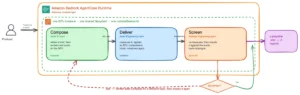
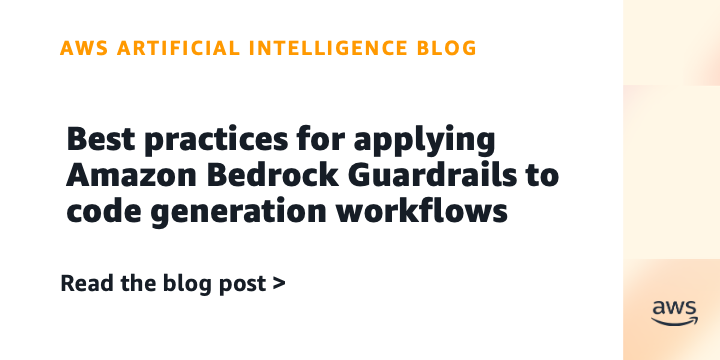
The core best practice is to shift from continuous inline scanning to selective validation at strategic checkpoints, analogous to a pre-commit hook in a Git workflow. Instead of scanning every token as it streams, content is validated at well-defined boundaries where the risk profile changes.
Why "Pre-Commit Hook" Thinking Works
Software developers do not run linters, formatters, and security scanners after every single line they type. Instead, they validate at commit time. They avoid validating every intermediate edit, every deleted line, or every half-written function. Instead, they validate the finished result at the moment it matters.
In a Git workflow, a pre-commit hook is a script that runs automatically at a specific, well-defined boundary: the moment a user attempts to commit code to their repository. It serves as the final gate before changes become part of the shared codebase. At this checkpoint, validations and tests are executed collectively, against the final artifact that is about to be persisted.
This pattern effectively balances two competing needs: thoroughness (every committed change is fully validated) and efficiency (validation only occurs when the risk profile changes, as code moves from "draft in progress" to "artifact being persisted").
Applying the Pattern to Amazon Bedrock Guardrails
The fundamental best practice is to apply this same principle to Amazon Bedrock Guardrails: transition from continuous inline scanning to selective validation at strategic checkpoints.
Consider your code generation pipeline as having natural commit points—moments where content transitions from one trust level to another:
- User Input: The initial prompt provided by the developer.
- Final Code Artifact: The complete block of code generated by the AI, ready to be integrated.
- Code Commit: The point where the code is saved to a repository or deployed.
Between these checkpoints, while the model is reasoning, generating intermediate tokens, or producing chain-of-thought explanations, the content is ephemeral. It has not crossed a trust boundary. Scanning it continuously adds cost and consumes quota without significantly improving your security posture.
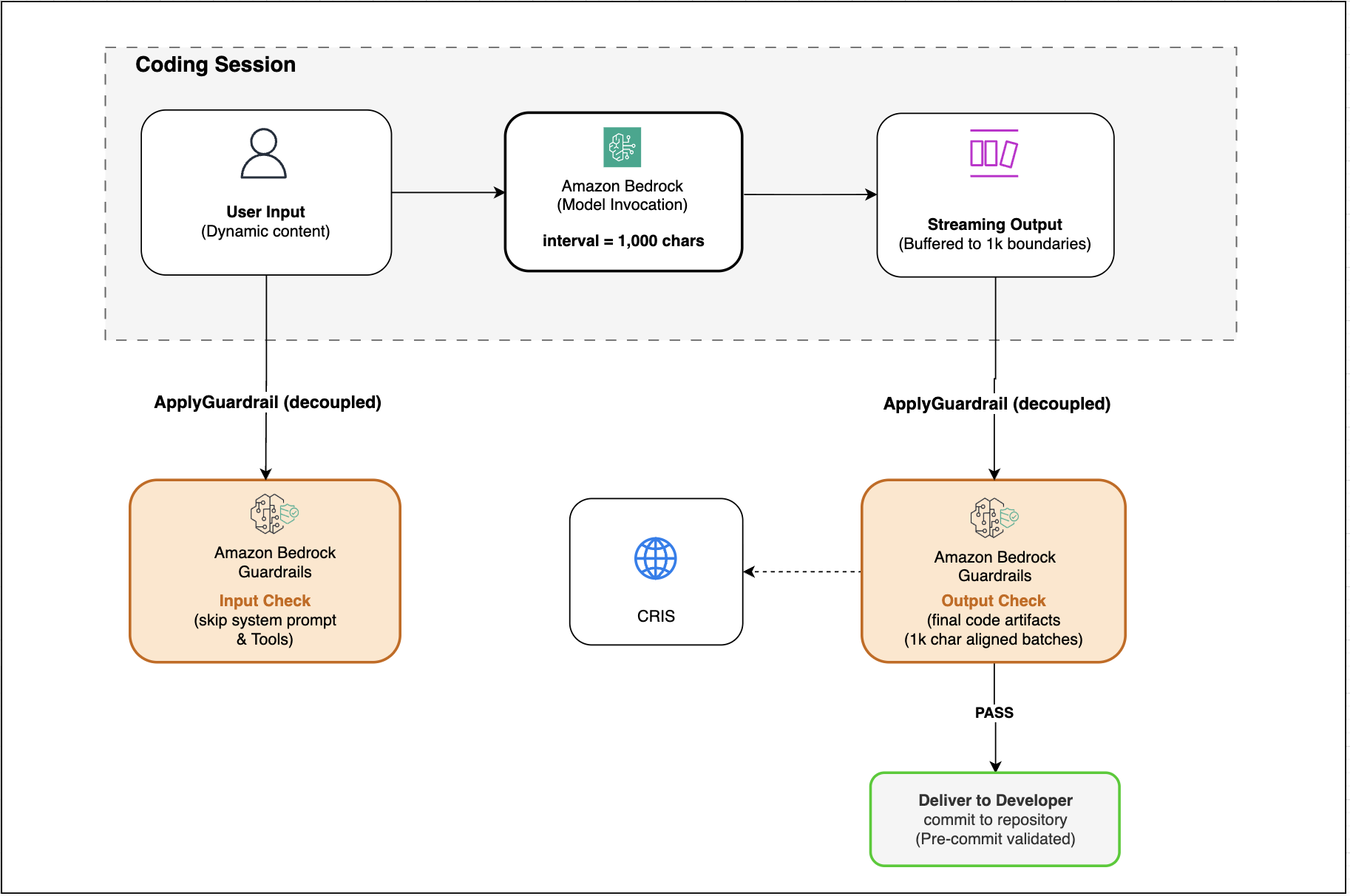
Key Principle: Utilize the decoupled ApplyGuardrail API to evaluate user-supplied inputs before they reach the model, and validate aggregated final code artifacts before they are committed, rather than evaluating every intermediate reasoning token.
Implementation: Pre-Commit Validation for File Operations
For the highest-risk checkpoint—when AI-generated code is about to be written to a file or committed to a repository—perform comprehensive guardrail evaluation. This is the pre-commit hook pattern applied directly:
import hashlib
from pathlib import Path

class CodeCommitGuardrail:
    """
    Validates all AI-generated code changes before they are persisted.
    Analogous to running security scanners in a Git pre-commit hook.

    Use this when:
    - A coding assistant writes code to disk
    - AI-generated changes are staged for commit
    - Generated code is about to be deployed
    """

    def __init__(self, client, guardrail_id, guardrail_version):
        self.client = client
        self.guardrail_id = guardrail_id
        self.guardrail_version = guardrail_version
        self.validated_hashes =   # Cache: don't re-validate unchanged files

    def validate_file_changes(self, staged_files: dict) -> dict:
        """
        Evaluate all staged AI-generated code changes before commit.

        Args:
            staged_files: Dict of file_path: file_content for all changed files

        Returns:
            Dict with 'safe' boolean and any violations found
        """
        violations = []
        skipped = []

        for file_path, content in staged_files.items():
            # Skip files that haven't changed since last validation
            content_hash = hashlib.sha256(content.encode()).hexdigest()
            if self.validated_hashes.get(file_path) == content_hash:
                skipped.append(file_path)
                continue

            # Evaluate in 1,000-char aligned chunks
            file_violations = self._evaluate_file(file_path, content)

            if file_violations:
                violations.extend(file_violations)
            else:
                # Cache successful validation
                self.validated_hashes[file_path] = content_hash

        return
            'safe': len(violations) == 0,
            'violations': violations,
            'files_evaluated': len(staged_files) - len(skipped),
            'files_skipped_cached': len(skipped)


    def _evaluate_file(self, file_path: str, content: str) -> list:
        """Evaluate a single file's content against guardrails."""
        violations = []

        for offset in range(0, len(content), 1000):
            chunk = content[offset:offset + 1000]

            response = self.client.apply_guardrail(
                guardrailIdentifier=self.guardrail_id,
                guardrailVersion=self.guardrail_version,
                source='OUTPUT',
                content=['text': 'text': chunk]
            )

            if response['action'] == 'GUARDRAIL_INTERVENED':
                violations.append(
                    'file': file_path,
                    'offset': offset,
                    'length': len(chunk),
                    'assessments': response['assessments'],
                    'snippet': chunk[:200] + '...' if len(chunk) > 200 else chunk
                )

        return violations

# Example: Integration with a coding assistant's file-write operation
def write_ai_generated_code(file_path: str, content: str, guardrail: CodeCommitGuardrail):
    """
    Wrapper for file writes that validates content before persisting.
    """
    result = guardrail.validate_file_changes(file_path: content)

    if not result['safe']:
        print(f"Guardrail blocked write to file_path")
        for v in result['violations']:
            print(f"  Violation at offset v['offset']: v['assessments']")
        return False

    # Safe to write
    Path(file_path).write_text(content)
    print(f"file_path validated and written successfully")
    return True
Architecture Pattern 2: Increase the Streaming Interval to 1,000 Characters
When real-time streaming evaluation is necessary—for example, in interactive coding sessions where immediate halting upon detecting a violation is desired—optimizing the streaming interval is key. Increasing the guardrail interval from the default 50 characters to 1,000 characters can reduce API call volume by a factor of 20.
# When using InvokeModelWithResponseStream with guardrails
response = bedrock_runtime.invoke_model_with_response_stream(
    modelId='anthropic.claude-sonnet-4-20250514',
    body=json.dumps(request_body),
    guardrailIdentifier='your-guardrail-id',
    guardrailVersion='1',
    # Key configuration: increase streaming interval
    streamingConfigurations=
        'guardrailStreamingInterval': 1000  # Default is 50!

)
Impact: A 5,000-character function, which previously required 100 evaluations, now needs only 5. Similarly, a 50,000-character file drops from 1,000 evaluations to 50.
Architecture Pattern 3: Use the Decoupled ApplyGuardrail API for Selective Evaluation
The standalone ApplyGuardrail API enables the use of Amazon Bedrock Guardrails irrespective of the foundation model, allowing text evaluation without invoking the foundation model itself.
Pattern: Input-Only Validation with Unguarded Inference
When the primary concern is preventing prompt injection and blocking malicious inputs, validate only the dynamic user content before it reaches the model. In this scenario, invoke the model without inline guardrails:
import boto3
import json

bedrock_runtime = boto3.client('bedrock-runtime')

def process_coding_request(user_input: str, system_prompt: str, conversation_history: list):
    """
    Validate user input with guardrails, then invoke model without inline scanning.
    The system prompt and conversation history are NOT re-evaluated every turn.
    """

    # Step 1: Evaluate ONLY the new dynamic user input
    guardrail_response = bedrock_runtime.apply_guardrail(
        guardrailIdentifier='your-guardrail-id',
        guardrailVersion='1',
        source='INPUT',
        content=[

                'text':
                    'text': user_input  # Only the new content - not the full prompt


        ]
    )

    if guardrail_response['action'] == 'GUARDRAIL_INTERVENED':
        return
            'blocked': True,
            'message': guardrail_response['outputs'][0]['text'],
            'assessments': guardrail_response['assessments']


    # Step 2: Safe to proceed - invoke model WITHOUT inline guardrails
    # The system prompt and history bypass redundant evaluation
    messages = conversation_history + ['role': 'user', 'content': user_input]

    response = bedrock_runtime.converse(
        modelId='anthropic.claude-sonnet-4-20250514',
        messages=messages,
        system=['text': system_prompt]
        # Note: No guardrailConfig here - we've already validated input
    )

    return
        'blocked': False,
        'response': response['output']['message']['content'][0]['text']
Why This Matters for Coding Workflows: In a typical coding session, the system prompt (often 2,000-5,000 characters of tool definitions and instructions) and conversation history (growing with each turn) are resent on every invocation. With inline evaluation, this static content is re-scanned every single turn. With the decoupled approach, only the ~200-character user message that actually changed is evaluated.
Pattern: Output-Only Validation at Completion
When the need is to scan generated code for sensitive information (leaked credentials, hardcoded secrets) but confidence exists that the user input is benign (e.g., internal developer tools behind authentication), validate only the final output:
def generate_and_validate_code(user_input: str, system_prompt: str):
    """
    Generate code without inline guardrail overhead, then validate the complete output.
    Ideal for detecting secrets, PII, or unsafe patterns in generated code.
    """

    # Step 1: Generate code without inline guardrail overhead
    response = bedrock_runtime.converse(
        modelId='anthropic.claude-sonnet-4-20250514',
        messages=['role': 'user', 'content': user_input],
        system=['text': system_prompt]
    )

    generated_code = response['output']['message']['content'][0]['text']

    # Step 2: Validate the COMPLETE code artifact - not intermediate chunks
    guardrail_response = bedrock_runtime.apply_guardrail(
        guardrailIdentifier='your-guardrail-id',
        guardrailVersion='1',
        source='OUTPUT',
        content=[

                'text':
                    'text': generated_code


        ]
    )

    if guardrail_response['action'] == 'GUARDRAIL_INTERVENED':
        return
            'blocked': True,
            'message': 'Generated code contains sensitive content that was blocked.',
            'assessments': guardrail_response['assessments']


    return
        'blocked': False,
        'code': generated_code
Pattern: Bidirectional Validation with Selective Scope
For maximum coverage, validate inputs for injection attacks and outputs for sensitive content while still avoiding the overhead of inline scanning:
def secure_code_generation_pipeline(user_input: str, system_prompt: str, history: list):
    """
    Full bidirectional validation without inline scanning overhead.
    Input: Check for prompt injection/manipulation
    Output: Check for leaked secrets and unsafe patterns
    """

    # Step 1: Validate input for prompt injection
    input_check = bedrock_runtime.apply_guardrail(
        guardrailIdentifier='your-guardrail-id',
        guardrailVersion='1',
        source='INPUT',
        content=['text': 'text': user_input]
    )

    if input_check['action'] == 'GUARDRAIL_INTERVENED':
        return 'blocked': True, 'stage': 'input', 'reason': input_check['outputs'][0]['text']

    # Step 2: Generate code - no inline guardrails needed
    messages = history + ['role': 'user', 'content': user_input]
    response = bedrock_runtime.converse(
        modelId='anthropic.claude-sonnet-4-20250514',
        messages=messages,
        system=['text': system_prompt]
    )
    generated_code = response['output']['message']['content'][0]['text']

    # Step 3: Validate output for sensitive information
    output_check = bedrock_runtime.apply_guardrail(
        guardrailIdentifier='your-guardrail-id',
        guardrailVersion='1',
        source='OUTPUT',
        content=['text': 'text': generated_code]
    )

    if output_check['action'] == 'GUARDRAIL_INTERVENED':
        return 'blocked': True, 'stage': 'output', 'reason': output_check['outputs'][0]['text']

    return 'blocked': False, 'code': generated_code
Architecture Pattern 4: Batch Output to Text Unit Aligned Boundaries
Since a 600-character chunk still costs one full text unit (1,000 characters), always batch to multiples of 1,000 characters to avoid partial-unit waste:
import asyncio

class GuardrailBatcher:
    """Accumulates streaming output and evaluates at 1,000-char boundaries."""

    def __init__(self, client, guardrail_id, guardrail_version):
        self.client = client
        self.guardrail_id = guardrail_id
        self.guardrail_version = guardrail_version
        self.buffer = ""
        self.BATCH_SIZE = 1000  # Align to TextUnit boundary

    async def process_chunk(self, chunk: str):
        """Buffer chunks and evaluate when we hit a TextUnit boundary."""
        self.buffer += chunk

        while len(self.buffer) >= self.BATCH_SIZE:
            # Extract exactly 1,000 characters for evaluation
            batch = self.buffer[:self.BATCH_SIZE]
            self.buffer = self.buffer[self.BATCH_SIZE:]

            response = self.client.apply_guardrail(
                guardrailIdentifier=self.guardrail_id,
                guardrailVersion=self.guardrail_version,
                source='OUTPUT',
                content=['text': 'text': batch]
            )

            if response['action'] == 'GUARDRAIL_INTERVENED':
                raise GuardrailViolation(response)

    async def flush(self):
        """Evaluate any remaining content at end of stream."""
        if self.buffer:
            response = self.client.apply_guardrail(
                guardrailIdentifier=self.guardrail_id,
                guardrailVersion=self.guardrail_version,
                source='OUTPUT',
                content=['text': 'text': self.buffer]
            )
            self.buffer = ""
            return response
Architecture Pattern 5: Risk-Based Evaluation Depth
Not all generated code carries the same risk. Code that interacts with IAM policies, secrets, or authentication deserves more thorough scanning than UI layout code. Implement adaptive evaluation depth based on content signals:
import re

class RiskBasedGuardrail:
    """
    Adjusts guardrail evaluation strategy based on the risk profile
    of the code being generated.

    High-risk code: Full evaluation with all safeguards
    Standard code: Lightweight evaluation (sensitive info only)
    Low-risk code: Skip intermediate evaluation; validate at commit only
    """

    # Patterns that indicate high-risk code
    HIGH_RISK_PATTERNS = [
        r'iam[_.]',                           # IAM policy manipulation
        r'(access_key|secret_key|password)',   # Credential handling
        r'(exec|eval|subprocess|os.system)',  # Code execution
        r'(BEGIN.*PRIVATE KEY)',               # Cryptographic keys
        r'(security_group|nacl|firewall)',     # Network security
        r'(grant|revoke|permission)',          # Authorization
        r'(encrypt|decrypt|kms)',              # Encryption operations
    ]

    # Patterns that indicate low-risk code
    LOW_RISK_PATTERNS = [
        r'(.css|style|className|fontSize)',   # Styling
        r'(render|component|jsx|tsx)',         # UI components
        r'(test|spec|mock|fixture)',           # Test files
        r'(README|docs|comment)',              # Documentation
    ]

    def __init__(self, client, guardrail_id_full, guardrail_id_lightweight):
        self.client = client
        self.guardrail_id_full = guardrail_id_full                # All safeguards active
        self.guardrail_id_lightweight = guardrail_id_lightweight  # Sensitive info only

    def classify_risk(self, code: str, file_path: str = "") -> str:
        """Determine risk level of generated code."""
        combined = code + " " + file_path

        for pattern in self.HIGH_RISK_PATTERNS:
            if re.search(pattern, combined, re.IGNORECASE):
                return 'HIGH'

        for pattern in self.LOW_RISK_PATTERNS:
            if re.search(pattern, combined, re.IGNORECASE):
                return 'LOW'

        return 'STANDARD'

    def evaluate(self, code: str, file_path: str = "") -> dict:
        """
        Evaluate code with appropriate depth based on risk classification.
        """
        risk_level = self.classify_risk(code, file_path)

        if risk_level == 'LOW':
            # Low-risk: defer to commit-time validation
            return
                'action': 'PASS',
                'risk_level': 'LOW',
                'evaluation': 'deferred_to_commit',
                'reason': 'Content classified as low-risk (UI/tests/docs)'


        # Choose guardrail based on risk
        guardrail_id = (
            self.guardrail_id_full if risk_level == 'HIGH'
            else self.guardrail_id_lightweight
        )

        response = self.client.apply_guardrail(
            guardrailIdentifier=guardrail_id,
            guardrailVersion='1',
            source='OUTPUT',
            content=['text': 'text': code]
        )

        return
            'action': response['action'],
            'risk_level': risk_level,
            'evaluation': 'full' if risk_level == 'HIGH' else 'lightweight',
            'assessments': response.get('assessments', [])


# Example: Using risk-based evaluation in a coding pipeline
risk_guardrail = RiskBasedGuardrail(
    client=bedrock_runtime,
    guardrail_id_full='guardrail-all-safeguards',
    guardrail_id_lightweight='guardrail-sensitive-info-only'
)
# High-risk: IAM policy code — full evaluation (3 safeguards)
# WARNING: The following is an example of an INSECURE anti-pattern used here
# solely to demonstrate guardrail detection. Never use wildcard permissions
# (Action: '*', Resource: '*') in production. Always follow the principle of
# least privilege. See: https://docs.aws.amazon.com/IAM/latest/UserGuide/best-practices.html#grant-least-privilege
iam_code = """
policy = iam.create_policy(
PolicyName='AdminAccess',
PolicyDocument=json.dumps(
'Statement': ['Effect': 'Allow', 'Action': '*', 'Resource': '*']
)
)
"""
result = risk_guardrail.evaluate(iam_code, "deploy/iam_policies.py")
# → risk_level: HIGH, evaluation: full
# Low-risk: React component — deferred to commit
ui_code = """
function Button( label, onClick )
return <button className="btn-primary" onClick=onClick>label</button>;
"""
result = risk_guardrail.evaluate(ui_code, "src/components/Button.tsx")
# → risk_level: LOW, evaluation: deferred_to_commitArchitecture Pattern 6: Multi-Stage Agent Pipeline
Agentic coding workflows, where the model uses tools, reasons over multiple steps, and produces intermediate outputs, necessitate a different evaluation strategy than single-turn generation:
class AgentPipelineGuardrail:
    """
    Guardrail architecture for multi-step agentic coding workflows.

    Key insight: In an agent loop, the model may take 5-10 reasoning steps
    (tool calls, observations, reflections) before producing final code.
    Evaluating every intermediate step is wasteful - most contain internal
    reasoning that never reaches the user or a file system.

    Strategy:
    - INPUT: Validate user request before agent starts
    - INTERMEDIATE: Skip chain-of-thought and tool-use reasoning
    - TOOL INPUTS: Validate when agent writes to file or executes code
    - FINAL OUTPUT: Validate the complete response shown to the user
    """

    def __init__(self, client, guardrail_id, guardrail_version):
        self.client = client
        self.guardrail_id = guardrail_id
        self.guardrail_version = guardrail_version

    def run_agent_with_guardrails(self, user_request: str, agent):
        """
        Execute an agentic coding workflow with strategic guardrail placement.
        """

        # Gate 1: Validate user input BEFORE agent starts working
        input_check = self._evaluate(user_request, 'INPUT')
        if input_check['action'] == 'GUARDRAIL_INTERVENED':
            return 'blocked': True, 'stage': 'input', 'response': input_check

        # Run the agent - NO guardrail evaluation during reasoning steps
        agent_steps = []
        final_output = None

        for step in agent.run(user_request):
            if step['type'] == 'thinking':
                # Skip: internal reasoning doesn't need evaluation
                agent_steps.append(step)
                continue

            elif step['type'] == 'tool_call':
                # Gate 2: Validate ONLY dangerous tool inputs
                if self._is_dangerous_tool(step['tool_name']):
                    tool_check = self._evaluate(
                        json.dumps(step['tool_input']), 'OUTPUT'
                    )
                    if tool_check['action'] == 'GUARDRAIL_INTERVENED':
                        return
                            'blocked': True,
                            'stage': f"tool_call:step['tool_name']",
                            'response': tool_check

                agent_steps.append(step)

            elif step['type'] == 'final_response':
                final_output = step['content']

        # Gate 3: Validate final output before showing to user
        if final_output:
            output_check = self._evaluate(final_output, 'OUTPUT')
            if output_check['action'] == 'GUARDRAIL_INTERVENED':
                return 'blocked': True, 'stage': 'output', 'response': output_check

        return
            'blocked': False,
            'output': final_output,
            'steps_taken': len(agent_steps),
            'steps_evaluated': sum(
                1 for s in agent_steps
                if s['type'] == 'tool_call' and self._is_dangerous_tool(s.get('tool_name', ''))
            )


    def _is_dangerous_tool(self, tool_name: str) -> bool:
        """Tools that write to disk or execute code need guardrail evaluation."""
        dangerous_tools =
            'write_file', 'execute_code', 'run_command',
            'create_file', 'edit_file', 'bash'

        return tool_name in dangerous_tools

    def _evaluate(self, content: str, source: str) -> dict:
        return self.client.apply_guardrail(
            guardrailIdentifier=self.guardrail_id,
            guardrailVersion=self.guardrail_version,
            source=source,
            content=['text': 'text': content]
        )
The Complete Decision Framework
The following table summarizes a decision framework for various checkpoints in code generation workflows:
| Checkpoint | What to Validate | How | Text Unit Impact |
|---|---|---|---|
| User input (each turn) | Dynamic user content only | ApplyGuardrail (source=INPUT) | Low—only new content evaluated |
| Streaming output | Active content as it streams | Set interval to 1,000 chars | Potential 20x reduction compared to default |
| Completed response | Final aggregated code artifact | ApplyGuardrail (source=OUTPUT) | One-time comprehensive pass |
| Pre-commit / file save | AI-generated code changes | ApplyGuardrail (source=OUTPUT) | Comprehensive but infrequent |
| Agent tool calls | Only dangerous tools (write/execute) | ApplyGuardrail (source=OUTPUT) | Targeted—skip benign tools |
| Intermediate reasoning | Skip entirely | Don’t evaluate CoT tokens | Zero |
Key Takeaways
- Shift from Inline to Strategic Validation: Move away from continuous, token-by-token scanning towards validating at critical junctures like pre-commit or upon completion of substantial code blocks.
- Optimize Streaming Intervals: For interactive sessions, increasing the
guardrailStreamingIntervalto 1,000 characters can drastically reduce evaluation overhead. - Leverage the Decoupled
ApplyGuardrailAPI: Use this API for granular control, allowing input-only validation before inference or output-only validation after generation, thereby avoiding redundant scans of static context. - Batch to Text Unit Boundaries: Always ensure data chunks sent to the guardrail API are aligned with 1,000-character boundaries to prevent wasted text unit consumption.
- Implement Risk-Based Evaluation: Dynamically adjust the depth and breadth of guardrail checks based on the identified risk profile of the code being generated, focusing intensive scrutiny on high-risk areas.
- Tailor for Agentic Workflows: For multi-step agent pipelines, apply guardrails only at the initial user input, for dangerous tool calls, and for the final output, skipping intermediate reasoning steps.
Conclusion
In this post, we have proposed best practices to optimize AI-assisted code generation workflows with Amazon Bedrock Guardrails. By adopting these architectural patterns, organizations can build robust and scalable generative AI solutions that