Open source project management (PM) software has solidified its position as a compelling and legitimate alternative to commercial platforms, moving far beyond its former status as a niche curiosity. As organizations navigate increasingly complex projects and tighten budget constraints, the appeal of solutions offering transparency, customization, and cost-effectiveness has grown exponentially. For businesses evaluating their project management toolset in 2026, understanding the landscape of open source offerings is crucial for making informed strategic decisions. This guide explores the defining characteristics, advantages, challenges, and leading options available in this dynamic sector.
Understanding Open Source Project Management Software
At its core, open source project management software refers to any planning, tracking, or collaboration tool whose source code is publicly accessible. This transparency allows anyone to inspect, modify, and redistribute the software, typically under licenses such as MIT, GPL, or MPL. This model fundamentally distinguishes it from proprietary platforms like Asana or Monday.com, where users are limited by vendor-defined features, pricing structures, and development roadmaps.
A significant differentiator for open source PM tools is the flexibility they offer in deployment. Most can be self-hosted on a company’s own servers, granting complete control over data residency and security. This is particularly attractive for organizations with stringent compliance requirements or those operating in sensitive sectors. Alternatively, many open source projects offer paid cloud-hosted versions, maintained by the same teams responsible for the core software, providing convenience and professional support without the self-hosting overhead. In essence, teams often gain core functionalities—tasks, boards, timelines, reporting—for free, with the option to pay only for managed hosting, dedicated support, or advanced premium features as their needs evolve.
The Growing Appeal of Open Source in Project Management
The increasing adoption of open source project management solutions is not driven by a pursuit of "open source" as an end in itself, but rather as a strategic response to common challenges faced with traditional proprietary software. The primary drivers typically include:
- Cost Efficiency: The escalating per-seat licensing costs of commercial PM software can become prohibitive as teams and organizations expand. Open source offers a way to scale without incurring exponential expenditure on licenses.
- Data Sovereignty and Compliance: For industries like healthcare, finance, or government, strict regulatory frameworks often necessitate self-hosting and full control over data. Open source tools, with their on-premises deployment options, directly address these data residency and compliance requirements, mitigating risks associated with third-party cloud storage.
- Customization and Flexibility: Proprietary tools can be rigid, with feature sets that may not perfectly align with an organization’s unique workflows. Open source software provides the freedom to inspect, modify, and extend the codebase, allowing teams to tailor the software to their exact operational needs, integrate it deeply with existing systems, or develop bespoke plugins.
- Trust and Transparency: The ability to audit the source code fosters a higher degree of trust, as organizations can verify security practices and ensure there are no hidden backdoors or data exploitation mechanisms. This transparency is a significant draw for security-conscious entities.
- Community and Innovation: Open source projects often benefit from vibrant communities of developers and users who contribute to bug fixes, feature enhancements, and documentation. This collaborative environment can lead to rapid innovation and robust, well-tested software. For technical teams, the ability to "fork" a project, extend it, or build a plugin offers a direct path to addressing specific needs without waiting for a vendor’s product roadmap.
Key Advantages of Open Source PM Solutions
The benefits of open source project management extend significantly beyond merely being "free." They empower organizations with a level of control, transparency, and long-term adaptability that proprietary Software-as-a-Service (SaaS) platforms typically cannot match. However, realizing these advantages often requires a certain degree of technical capability within the adopting organization.
- Unparalleled Control: Organizations gain complete ownership of their data and infrastructure, dictating where and how the software runs. This eliminates vendor lock-in and provides an exit strategy if needs change or a vendor discontinues support.
- Enhanced Security Through Scrutiny: The open nature of the source code allows for widespread peer review, meaning potential vulnerabilities can be identified and patched by the community or internal teams more rapidly than in closed-source systems.
- Cost Savings: While not entirely "free" due to potential hosting, customization, and support costs, the absence of licensing fees dramatically reduces the total cost of ownership, especially for large teams.
- Tailored Customization: The ability to modify the source code means the software can be precisely adapted to unique organizational processes, rather than forcing processes to conform to the software’s limitations.
- Community Support and Longevity: Many mature open source projects boast active communities, offering extensive documentation, forums, and volunteer support. This collective effort often ensures the software’s continued development and relevance over time, independent of a single company’s fate.
Navigating the Challenges: Considerations for Open Source Adoption
While the advantages are compelling, embracing open source project management is not without its trade-offs. The flexibility and control often come at the expense of time, specialized technical skills, or both. Organizations must realistically assess their internal capacities before committing to an open source tool.
- Technical Overhead: Self-hosting and maintaining open source software requires internal IT expertise for installation, configuration, updates, security patching, and troubleshooting. This can be a significant burden for teams without dedicated technical resources.
- Variable Support: While community support is a strength, it can also be inconsistent compared to the dedicated support channels offered by commercial vendors. Professional support for open source often comes at an additional cost through enterprise editions or third-party providers.
- Feature Parity and Polish: Some open source tools, particularly newer ones, might lack the polished user interface, extensive integrations, or advanced features (e.g., AI assistance, complex reporting) found in mature commercial platforms.
- Scalability for Enterprise: While many open source tools are scalable, ensuring high availability, performance, and data integrity for large, complex enterprise deployments can require sophisticated infrastructure management and specialized DevOps skills.
- Documentation and Learning Curve: Documentation can vary widely in quality and completeness across different projects. New users, especially those without a technical background, might face a steeper learning curve.
The 2026 Landscape: A Deep Dive into Leading Open Source Platforms
The market for open source project management software is robust and diverse in 2026, offering solutions tailored to a wide array of organizational sizes, methodologies, and technical competencies. Below is an in-depth look at ten of the strongest options currently available, detailing their core strengths, ideal users, and overall suitability.
1. OpenProject
OpenProject stands out as one of the most comprehensive open source tools capable of seamlessly accommodating agile, waterfall, and hybrid methodologies without compromise. It positions itself as a leading free and open source project management solution, engineered to support the entire project lifecycle—from initial planning and implementation through controlling and completion—under various frameworks, including formal approaches like PRINCE2 or PM². A key differentiator is its emphasis on data sovereignty, allowing for complete on-premises installation. The free Community edition is feature-rich, while the Enterprise tier offers professional support, add-ons, and advanced security features.
- Key Tools: Work package tracking, Gantt charts, Scrum/kanban boards, per-project wikis, on-premises hosting.
- Target Audience: Organizations requiring data sovereignty and support for both agile and traditional methodologies, particularly mid-to-large enterprises.
- Verdict: A robust, comprehensive option for organizations seeking a single tool to manage diverse project methodologies with strong data control. Requires Linux/Mac admin skills for self-hosting or an Enterprise upgrade for managed services.
2. Redmine
Redmine has built its enduring reputation on stability, flexibility, and a modular design. Developed on Ruby on Rails, it offers cross-platform and cross-database compatibility, allowing teams to activate only the modules they need—wikis, forums, repositories, time tracking—at the individual project level. While its interface is often described as utilitarian rather than modern, its strength lies in deep configurability. Workflow transitions can be defined per issue type and role, custom fields can be added extensively, and a mature plugin ecosystem extends its functionality to include agile boards, helpdesk ticketing, and CRM.

- Key Tools: Flexible issue tracking, role-based access, Gantt/calendar views, wikis, forums, plugin ecosystem.
- Target Audience: Technical teams seeking deep configurability and comfortable with self-setup and customization, valuing stability over modern aesthetics.
- Verdict: A powerful, highly flexible solution for technical teams willing to invest in configuration. Not ideal for those seeking an out-of-the-box, modern user experience.
3. ProjectLibre
ProjectLibre has achieved remarkable global reach as the most widely distributed open source project management software, with millions of downloads and extensive adoption in academia. It is specifically designed to facilitate migration from Microsoft Project, mirroring its ribbon-style menu and column layout. This familiarity allows users to open and continue working on existing MPP files with minimal relearning. It offers the classic toolkit for plan-driven project management, including Gantt charts, network diagrams, work breakdown structures, resource histograms, and detailed cost tracking. The desktop application is free and open source, while a separate Cloud offering provides multi-user collaboration and portfolio dashboards via subscription.
- Key Tools: Gantt charts, network diagrams, work breakdown structures, resource histograms, MPP file import/export.
- Target Audience: Teams and academics transitioning from Microsoft Project, or solo planners needing a free, desktop-based waterfall PM tool.
- Verdict: The premier free replacement for Microsoft Project, excellent for individual planning and traditional projects. Its desktop-first nature limits real-time team collaboration in the free edition.
4. Wekan
Wekan addresses a specific need: teams desiring the visual simplicity of a Trello-style kanban board without entrusting their data to a third-party server. This lightweight, self-hosted kanban application, released under the MIT license, organizes work through boards, lists, swimlanes, and cards, complete with titles, descriptions, due dates, labels, and comments. Its open source nature allows for security audits, and self-hosting ensures complete data privacy, which is critical for organizations with strict data sovereignty requirements. Access controls can be granularly managed at the board or user level. Wekan’s focus is on being an excellent, privacy-respecting kanban board, not a full-fledged PM suite.
- Key Tools: Kanban boards, lists, swimlanes, cards with attachments, comments, and labels, self-hosting.
- Target Audience: Teams seeking a simple, privacy-focused kanban solution and prioritizing data control over extensive PM features.
- Verdict: An effective, lightweight, and transparent self-hosted Trello alternative, ideal for simple task visualization and privacy-conscious teams. Lacks advanced PM features like Gantt charts or detailed reporting.
5. Trac
Trac offers a minimalist, web-based approach, integrating an enhanced wiki with issue tracking, designed to support established development processes without imposing excessive overhead. Released under the modified BSD license, its unique strength lies in the tight integration between its wiki and issue tracking, allowing for seamless linking of bugs, tasks, changesets, files, and wiki pages. A built-in timeline provides a chronological overview of project events, and a roadmap view outlines upcoming milestones. Trac natively integrates with Subversion and Git, making it a favorite among long-running software projects that prioritize low-ceremony development.
- Key Tools: Wiki-integrated issue tracking, timeline view, roadmap/milestones, native Git and Subversion integration.
- Target Audience: Software development teams seeking a minimalist issue tracker tightly integrated with version control, with minimal process overhead.
- Verdict: An excellent choice for developer-centric teams valuing wiki integration and version control. Lacks modern PM features such as sprints, kanban boards, or comprehensive dashboards.
6. Taiga
Taiga emerged from a specific frustration: the lack of an intuitive and visually appealing agile project management tool for mixed developer and designer teams. Its design reflects this origin, catering explicitly to cross-functional teams employing both Scrum and kanban frameworks, allowing them to switch between or blend methodologies. Its feature set covers the full agile lifecycle, including backlog management, dedicated Scrum boards with epics and sub-tasks, and an intuitive kanban board. A team performance dashboard, including a unique "team health Iocane function," provides additional visibility. While highly regarded for usability, the long-term maintenance is a consideration, as its founding company, Kaleidos, has wound down operations.
- Key Tools: Backlog management, Scrum sprint boards, kanban boards, team performance dashboards.
- Target Audience: Agile teams, particularly mixed developer/designer teams, prioritizing an intuitive, visually appealing Scrum and kanban tool.
- Verdict: One of the best-designed agile tools in open source, offering excellent usability. Users should consider the implications of its founding company’s status for long-term support and updates.
7. Odoo Project (Community Edition)
Odoo Project is not a standalone PM tool but a module within the broader Odoo open source business management suite, which encompasses CRM, sales, inventory, and accounting. The free Community edition, licensed under LGPLv3, provides full access to the source code for customization. Within the Project app, users can manage tasks across kanban boards, Gantt-style timelines, calendar, and list views, with features for attachments, messages, deadlines, and dependencies. Its integration within the Odoo ecosystem allows for seamless workflows, such as creating projects from sales orders and linking task time to invoicing. This makes it ideal for businesses seeking to embed project management deeply into their broader operational and financial processes.
- Key Tools: Kanban/Gantt/calendar task views, timesheets, sales order and invoicing integration, profitability reports.
- Target Audience: Businesses already using or planning to adopt other Odoo applications, seeking project management tightly integrated with broader business operations.
- Verdict: Excellent for organizations that need project work connected to billing, sales, and operations. Overkill for teams requiring a simple, standalone task tracker.
8. Plane
Plane is a relatively new entrant, positioned as a modern open source alternative to commercial tools like Jira, Linear, and ClickUp. It offers a clean, contemporary interface and a rapidly evolving feature set. The free Community Edition, licensed under AGPL-3.0, can be self-hosted via Docker or Kubernetes, and a separate free cloud tier is also available. This edition is full-featured, including unlimited projects, work items, cycles (sprints), modules, pages, five different layout views, intake management, dashboards, estimates, a REST API, and webhooks. It supports rich text editing, attachments, custom statuses, and configurable work item types. Sprint planning includes burn-down charts and velocity tracking. A Commercial Edition provides additional governance and integration capabilities for larger enterprises.
- Key Tools: Work item tracking, sprint cycles with burndown charts, wiki-style pages, REST API and webhooks, modern interface.
- Target Audience: Development teams seeking a modern, full-featured Jira/Linear-style interface without commercial licensing costs, willing to adopt a newer platform.
- Verdict: A compelling option for teams desiring a contemporary, actively developed tool with a generous free tier. Its youth means it has a shorter track record compared to more established alternatives.
9. Tuleap
Tuleap positions itself as an all-in-one Agile Application Lifecycle Management (ALM) platform, designed for organizations that require comprehensive management of requirements, development, testing, and delivery with full traceability. It supports a wide range of methodologies—Scrum, kanban, SAFe, V-model, DevOps, or custom hybrids—allowing teams to configure workflows, fields, and views to match existing processes. This flexibility is particularly valuable in regulated industries like aerospace, defense, automotive, and healthcare, where end-to-end traceability from requirements to testing and delivery is mandatory. Tuleap can be hosted internally for sovereign, auditable infrastructure, and a French-based support team offers professional assistance.
- Key Tools: End-to-end ALM, Scrum/kanban/SAFe support, requirement-to-test traceability, on-premises hosting.
- Target Audience: Regulated industries and large enterprises needing full lifecycle traceability, compliance support, and the flexibility to adopt various methodologies.
- Verdict: Highly capable for compliance-heavy organizations with complex ALM needs. Its depth implies significant setup overhead, making it an overkill for small teams with simple task tracking requirements.
10. ZenTao
ZenTao, originating from China, has evolved into a comprehensive, all-in-one platform since its founding in 2009. It integrates product management, project management, quality/test management, document management, and even organizational and office management within a single system. This consolidation aims to eliminate the need for integrating multiple separate tools for bug tracking, test case management, and project planning. The Community edition is free forever, with no user or time restrictions, and is dual-licensed under ZPL and AGPL with API-enabled modules. ZenTao supports both Scrum and Waterfall approaches, featuring product backlogs, sprint and release planning, burndown charts, kanban boards, and bug tracking. It also integrates with Git, GitLab, SVN, SonarQube, and CI/CD pipelines like Jenkins. Paid tiers (Biz and Max) offer advanced features such as Gantt charts, LDAP integration, and sophisticated reporting.
- Key Tools: Product/project/quality management, bug tracking, sprint planning, Git/GitLab/Jenkins integrations.
- Target Audience: Teams seeking consolidated product management, testing, and project tracking in a single platform, especially those looking for a comprehensive, free-tier solution for Scrum planning.
- Verdict: Offers excellent value with an unlimited free tier that integrates various development and project management functions. Advanced features like Gantt charts are reserved for paid subscriptions.
ProjectManager Is the Best Alternative to Open Source Project Management Software
While open source project management software offers undeniable advantages in terms of cost, control, and customization, many organizations encounter significant frustrations related to self-hosting requirements, the complexities of plugin management, and the substantial technical overhead associated with maintaining these tools. For teams prioritizing a competitively priced, less complicated, and fully integrated solution, proprietary cloud-based platforms often present a more efficient alternative.
ProjectManager, an award-winning project and portfolio management software, serves as a preferred tool for project managers, resource managers, and their teams. It addresses the very challenges that drive some users to open source, such as cost savings and data control, but without the burdens of setup and maintenance. Teams migrate to ProjectManager to leverage its mobile app flexibility, or simply because they require a single, fully supported system rather than piecing together disparate open source tools. This platform offers a host of benefits that streamline project delivery.
Multiple Project Management Views
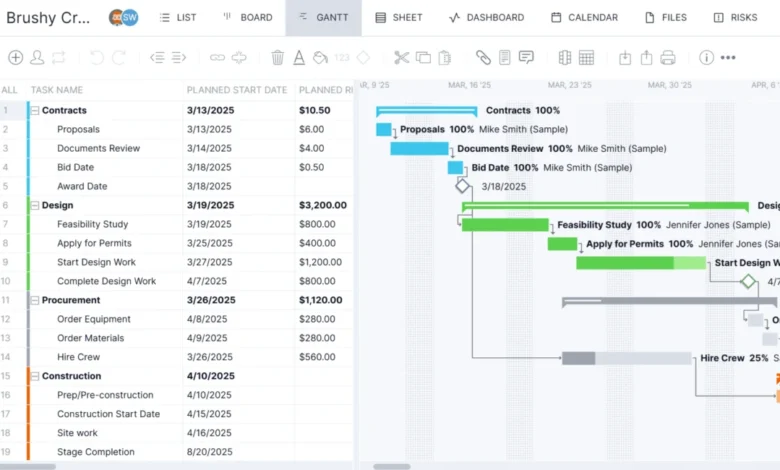
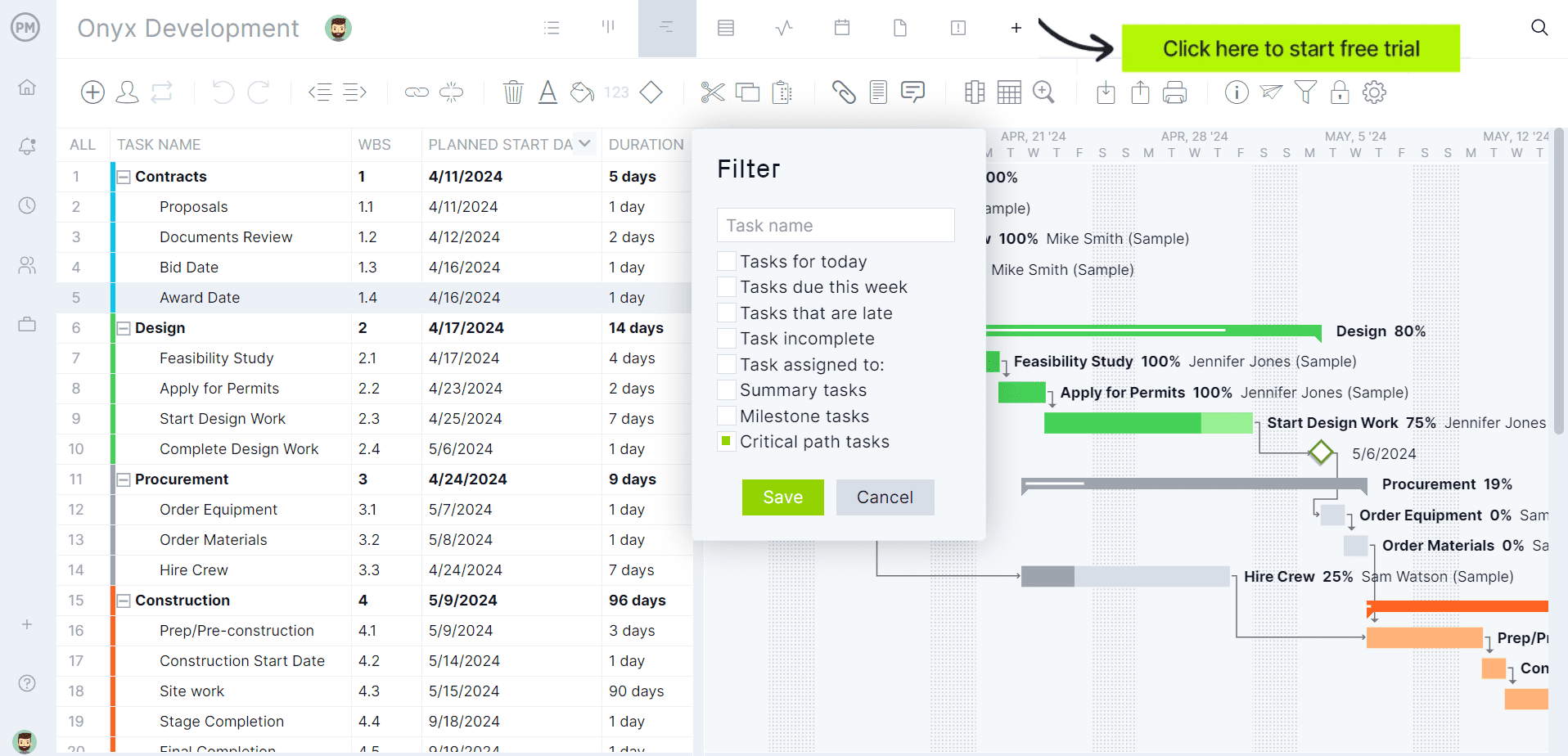
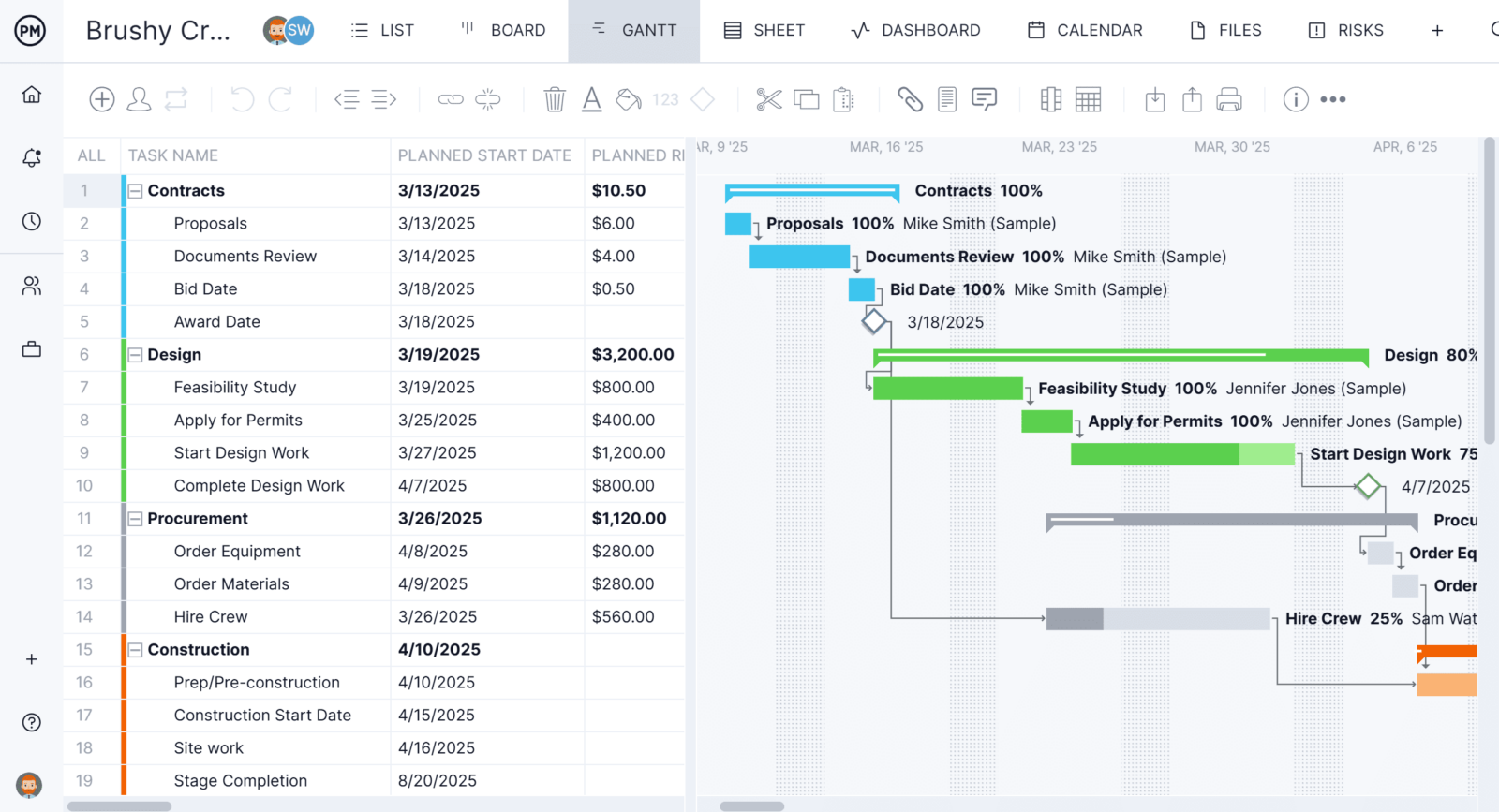
Recognizing that every team operates differently, ProjectManager provides diverse views to suit various work styles. Project managers can plan and track work using their preferred methodology, while team members can simultaneously access the same data in the view that best suits their individual tasks. For instance, projects can be meticulously built on a Gantt chart, allowing for the linking of all four types of task dependencies, filtering for the critical path, and setting baselines to track planned versus actual progress in real-time.
For those who prefer a more visual approach, the same tasks are dynamically reflected on a kanban board, where team members can intuitively drag and drop cards through custom workflow stages, eliminating the need for self-hosted plugins. Additionally, a calendar view facilitates at-a-glance scheduling, and a simple task list view caters to individuals focused on daily checklists. Crucially, all these views draw from a single, shared set of project data. Any status update made in one view is instantly mirrored across all others, ensuring that everyone is always working with the most current information, eliminating the need to reconcile multiple spreadsheets or wikis.
Robust Resource Planning Features
ProjectManager’s real-time connectivity to teams and project progress enables robust resource planning and tracking throughout the project lifecycle, circumventing the need to configure separate resource management plugins, which is often a requirement with open source tools. This capability begins during team onboarding, where project managers can define team availability, including PTO, time off, and holidays, simplifying task assignments. Both human and nonhuman resources, such as equipment and materials, can be planned on the Gantt chart and subsequently monitored via the team page or the color-coded workload chart. These features allow project managers to quickly identify overallocated or underutilized resources and balance workloads directly from these pages, ensuring optimal team capacity and productivity.
Real-Time Cost, Time, and Performance Dashboards
Unlike many open source tools that necessitate installing separate reporting plugins or waiting for community-developed add-ons, ProjectManager provides real-time tracking of resources, costs, and other critical metrics natively. For example, secure timesheets not only streamline the payroll process but also offer invaluable visibility into labor costs, aiding in budget adherence. For a high-level overview of key performance indicators (KPIs), the real-time project or portfolio dashboard automatically aggregates live data, presenting it on easy-to-read graphs and charts that track cost, time, workload, and more. For deeper analysis, customizable reports on project and portfolio status, variance, workload, and timesheets are available. These reports can be filtered to show specific progress and easily shared with stakeholders to maintain transparent communication.
ProjectManager is an online project management software designed to connect teams, whether they are co-located in an office or working remotely. It facilitates seamless collaboration through file sharing, task-level commenting, and instant updates via email and in-app notifications. Teams across diverse industries leverage this software to successfully deliver projects.
Related posts: